
Use attack paths to prioritise exposed Azure resources
You have a backlog of security alerts and recommendations. The secure score is rising, but the underlying risk remains unclear. Which issues actually matter? Which ones can an attacker chain together to reach a critical asset? Treating every alert as equally urgent leads to fatigue and missed exposure. The answer is to use attack path analysis to see the full chain of exploitation, then prioritise the steps that break those chains.
Defender for Cloud provides a cloud security graph that maps your resources, permissions, network connections, and vulnerabilities. It uses this graph to identify exploitable paths that attackers might use to breach your environment. This is distinct from the secure score, which aggregates static compliance recommendations. As of May 2025, risk prioritisation via attack paths does not affect the secure score calculation, so you must look at the attack paths view separately to understand dynamic risk.
Understand the difference between alerts and attack paths
Security alerts in Defender for Cloud indicate detected threats or misconfigurations. They are vital for incident response. You manage these alerts in the Security alerts blade, where you can filter by severity, status, and time. Each alert provides context, such as the affected resources and MITRE ATT&CK kill chain intent. However, an alert tells you what happened or what is wrong right now; it does not always show you the full path an attacker could take to reach your most sensitive data.
Attack path analysis, on the other hand, is a graph-based algorithm that scans the cloud security graph. It exposes exploitable paths that attackers might use to breach your environment to reach high-impact assets. It considers exposure to the internet, permissions, lateral movement possibilities, and vulnerabilities. By taking your environment’s contextual information into account, it identifies issues that might lead to a breach and suggests recommendations to break the path.
This distinction is crucial for prioritisation. A high-severity alert on a resource with no internet exposure and no lateral movement paths may be less urgent than a medium-severity misconfiguration that creates a bridge to a critical database. Attack paths help you see the bridge.
View attack paths in Defender for Cloud
To use attack paths, you need the Defender for Cloud CSPM plan. You also need to have either agentless scanning for VMs or the vulnerability assessment capability enabled on the Defender for Servers plan. Without this data, the cloud security graph lacks the vulnerability and lateral movement context needed for accurate path analysis.
- Sign in to the Azure portal and navigate to Microsoft Defender for Cloud.
- In the left-hand menu, select Attack paths under the Management section. If you do not see this option, ensure that the Defender for Cloud CSPM plan is enabled for your subscription.
- The Attack paths page lists the identified paths, ranked by risk. Each path shows the starting point, the intermediate steps, and the final high-impact asset.
The attack paths view provides a clear visualisation of the risk. It shows you the sequence of vulnerabilities and misconfigurations that an attacker could exploit. This is far more actionable than a list of isolated recommendations.
Prioritise remediation by breaking the chain
Once you have identified the attack paths, you need to decide which ones to fix first. The attack paths are ranked by risk, so start with the highest-risk paths. For each path, identify the recommendations that Defender for Cloud suggests to break the chain. These recommendations are the most effective steps you can take to reduce risk.
Focus on the recommendations that appear in multiple attack paths. Fixing one such recommendation can break several paths at once, giving you the most significant risk reduction for your effort. This is more efficient than fixing one recommendation per path, which might leave other paths intact.
It is important to note that the secure score does not reflect this dynamic risk. The secure score is based on the Microsoft Cloud Security Benchmark (MCSB) and aggregates static compliance recommendations. Risk prioritisation via attack paths does not affect the secure score. Therefore, you might see your secure score improve while the attack paths view still shows high-risk chains. Do not rely on the secure score alone to gauge your security posture. Use the attack paths view to understand the actual risk to your environment.
Verify the impact
After implementing the recommended changes, you should verify that the attack paths have been broken. Return to the Attack paths page and check if the previously identified paths are no longer present or if their risk level has decreased. This verification step is essential to ensure that your remediation efforts are effective.
You can also cross-reference the changes with the Security alerts page. If the attack path was based on a specific vulnerability or misconfiguration, you should see a reduction in related alerts. However, remember that alerts are reactive, while attack paths are proactive. The absence of an alert does not mean the path is gone; only the attack paths view can confirm that.
By focusing on attack paths, you move from a reactive stance of fixing alerts to a proactive stance of reducing exploitable risk. This approach ensures that your security efforts are directed towards the issues that matter most, protecting your high-impact assets from breach.
The next step is to integrate this prioritisation into your regular security review process. Schedule regular checks of the attack paths view and assign owners to the high-risk paths. This ensures that risk reduction is a continuous process, not a one-off exercise.
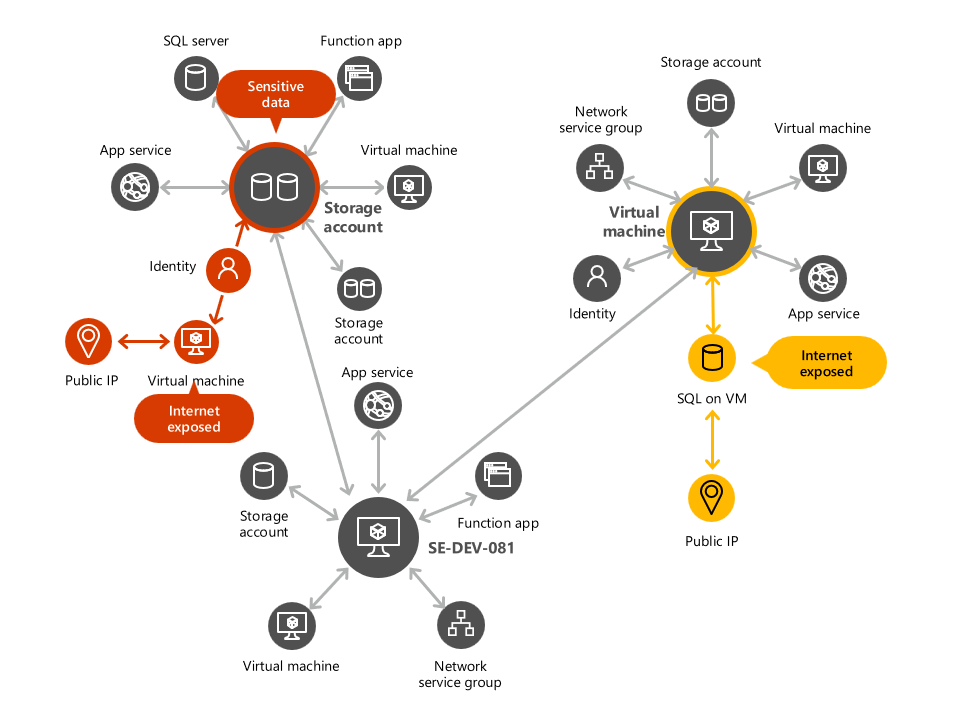
The cloud security graph forms the basis for attack path analysis. It maps your resources, permissions, and connections to identify exploitable paths.
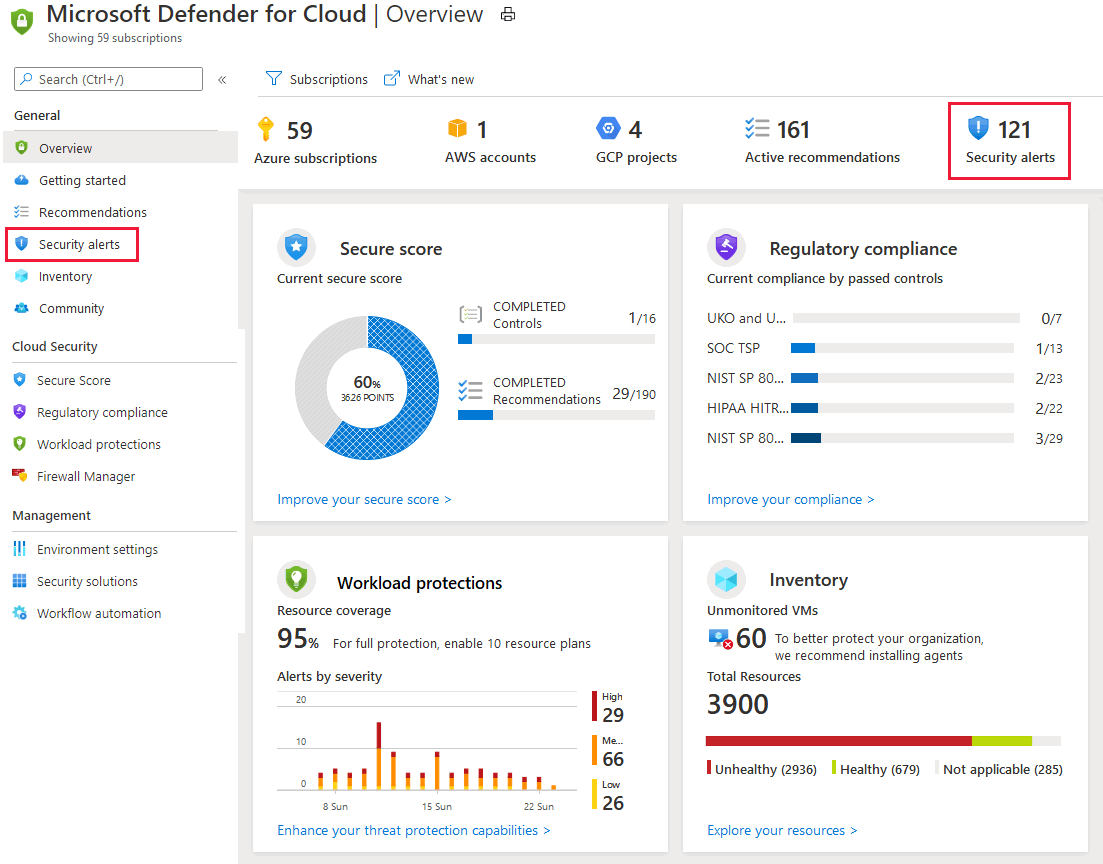
Security alerts provide immediate context for detected threats, but they do not show the full exploitable chain. Use attack paths to see the bigger picture.
References for Use attack paths to prioritise exposed Azure resources: Investigating risks with security explorer/attack paths in Microsoft Defender for Cloud, Manage and respond to security alerts, Secure score in Microsoft Defender for Cloud.