
Turn secure score findings into a practical remediation queue
Defender for Cloud can show a long list of recommendations without telling the operations team what to change this week. A useful remediation queue needs an affected resource, an owner, a proposed change and a way to verify the result. Secure score helps organise that work, but the percentage alone does not establish the order.
Start with a subscription whose workloads and owners are understood. A manageable scope makes it easier to distinguish an exposed production service from an unused lab resource and to check whether a proposed fix will disrupt an application.
Understand what contributes to the score
Microsoft’s secure score guidance describes how findings are grouped into security controls. The Microsoft cloud security benchmark is applied by default when Defender for Cloud is enabled for a subscription, and its built-in recommendations provide the basis for secure score.
Recommendations marked as preview do not contribute to that calculation. Nor does every useful security improvement earn points: the documented Implement security best practices control has no score contribution. Keep those findings in the security assessment rather than discarding them because they cannot improve the percentage.
A control’s Max score, Current score and Potential score increase describe its contribution. They do not measure the implementation effort or the business impact of a change. The combined score across subscriptions also uses weighting; it is not a simple average of their percentages.
Move from the overview to affected resources
In the Azure portal, open Microsoft Defender for Cloud and confirm the selected subscription scope. The overview provides the aggregate view:
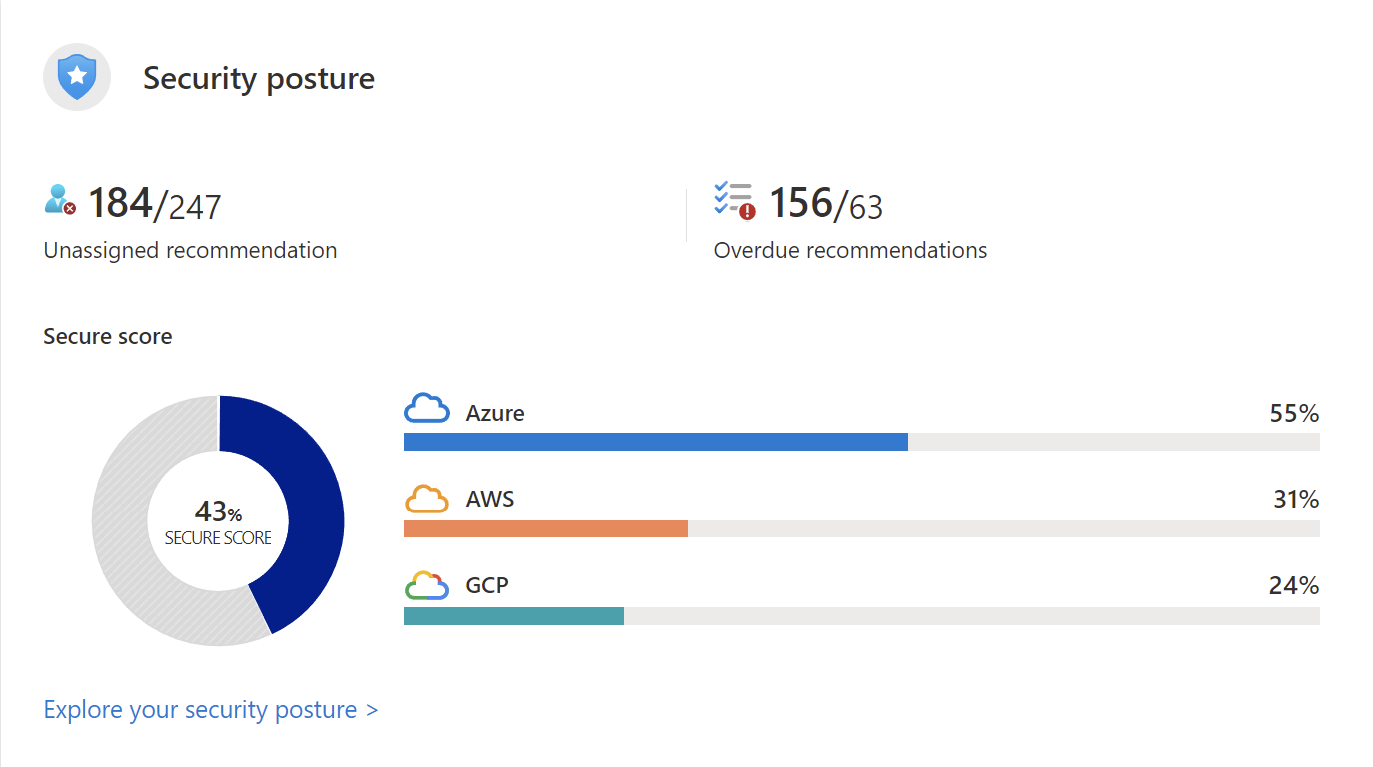
Use Security posture to explore the environment, then open the relevant recommendations and inspect their affected resources. On Recommendations, the Secure score recommendations view groups the controls and shows their score contribution.
For each candidate, read the assessment and remediation guidance before creating a task. Record the actual resource IDs and the condition being assessed. A heading such as “secure management ports” is a useful category, but it is not enough information for an engineer to implement a change.
Write a task an owner can complete
The following is an illustrative queue structure, not a report of findings in an existing subscription:
| Field | Example entry |
|---|---|
| Scope | A specific VM and its management network path |
| Finding | A recommendation identifies exposed management access |
| Owner | The team responsible for the VM and its network rules |
| Proposed change | Review permitted sources and establish the intended administration path |
| Dependency | Confirm that administrators retain an approved way to connect |
| Verification | Inspect the resulting access configuration, test the intended path and recheck the assessment |
Attach the recommendation and resource details to the work item. Separate the person accountable for completing it from the teams needed to approve or implement parts of the change.
For a storage recommendation, for example, an access restriction may also require application and DNS work. Assigning the whole item to the storage owner without identifying those dependencies is likely to produce an incomplete change or a stalled ticket.
Prioritise the risk and the change
Use score contribution as one input alongside exposure, workload importance and the consequence of failure. A high-scoring control with substantial dependencies may need planned work; a lower-scoring issue on a sensitive service may deserve earlier attention.
Record why an item was prioritised. Include the evidence behind an exception and when it will be reviewed. Avoid treating an exception as a completed remediation: the resource and its remaining exposure still need an owner.
Keep threat alerts in the appropriate investigation workflow. A posture recommendation and an active security alert can concern the same resource, but they ask for different evidence and response times.
Verify before closing, then prevent recurrence
Where Fix is available, review which resources it changes and what the documented action does. Where policy-based enforcement or denial is appropriate, check its scope, effect and application impact before assigning it. These options are not universally available for every recommendation.
After the change, inspect the resource and test the intended workload behaviour. Then allow the assessment to refresh and confirm that the recommendation reflects the expected state. Microsoft documents different update cadences for recommendations and their parent controls, so an unchanged aggregate score is not conclusive evidence that the change failed.
Retain that verification with the work item. If the same configuration can recur, feed the agreed setting into deployment templates or a suitable policy after testing it. The queue becomes useful when it records what changed and why the resource is safer, rather than only a movement in the score.