
What Defender for Cloud actually is: CNAPP in plain English
Episode 1 of the series Cloud Security – Microsoft Defender
A recommendation about a cloud resource, a suspicious activity alert and a finding from a repository can all belong to the same security conversation. They do not necessarily need the same response, or the same person to deal with them.
That distinction is a useful starting point for Microsoft Defender for Cloud. Before enabling another plan or building another dashboard, we need to understand the different jobs the platform helps us do.
Microsoft describes Defender for Cloud as a cloud-native application protection platform, usually shortened to CNAPP. The idea is to connect security across an application’s lifecycle, from development through to the cloud environment where it runs. The Defender for Cloud overview brings together posture management, DevOps security and workload protection under that description.
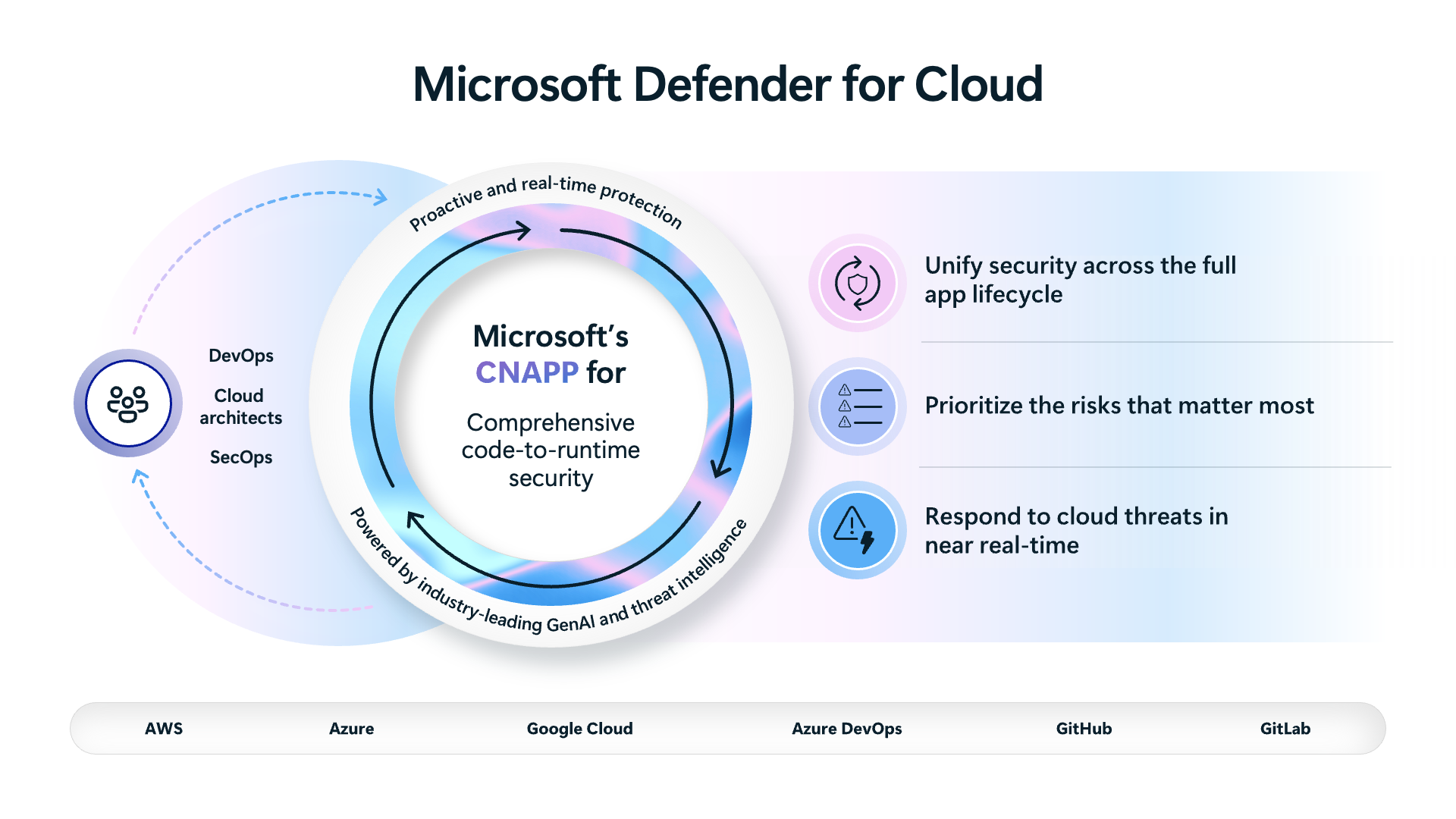
Three questions behind the acronym
We can make those three areas easier to work with by turning them into questions.
| Area | The question to ask | The action we are trying to identify |
|---|---|---|
| Cloud security posture management, or CSPM | How is this environment configured, and what risks need attention? | A configuration or exposure change with a responsible owner. |
| Cloud workload protection, or CWPP | What potentially threatening activity needs investigation? | An investigation and, where justified, a response. |
| DevOps security | What needs fixing in the code or delivery process? | A change that addresses the finding before it is deployed again. |
These are connected questions. They are not three subscription options, and the table is not a promise that every capability is available for every resource or cloud.
For posture management, Defender for Cloud assesses resources and produces recommendations. Microsoft separates the no-cost Foundational CSPM capabilities from the additional capabilities in the paid Defender CSPM plan. The CSPM documentation describes that distinction and the support considerations. We will work through the plan decision properly in Episode 3.
Workload protection addresses another part of the problem. Defender plans provide protection for particular resource types, and their security alerts identify activity that needs attention. Microsoft’s alerts and incidents guidance explains the relationship between those plans and the alerts they generate. A finding about a configuration and an alert about activity should therefore not be treated as interchangeable evidence.
DevOps security brings the development environment into the conversation. The DevOps security overview covers findings from code, secrets, dependencies and infrastructure-as-code scanning in connected environments. That helps explain why a cloud security review may need a developer to change a repository, rather than an administrator to change a setting in the portal.
Follow one application through those questions
Consider an illustrative application called Orders Demo. It has a web application, a storage account and a repository containing the deployment configuration. This hypothetical example gives us an application to follow through the series.
Suppose the team identifies a storage configuration that permits more network access than the application’s design requires. The first task is to establish the intended access path. Which clients need to reach the service? What would stop working if that access changed? Who can approve and implement the change?
That is a posture discussion. The recommendation helps identify work to investigate; the application and platform owners still need to agree what the correct configuration should be.
Now suppose a workload protection alert needs investigation. The team must examine the alert’s evidence, affected resource and activity. Closing the earlier configuration ticket would not, on its own, explain what happened or establish whether an incident occurred.
Finally, suppose the deployment configuration in the repository still creates the unwanted setting. A manual resource change might address the immediate configuration while leaving the next deployment ready to recreate it. The developer or infrastructure-as-code owner needs to review the source as well.
The value of connecting these views is practical: we can work on the current resource, investigate the activity and address the source of a recurring configuration problem. Each task needs its own evidence and owner.
Check protection separately from posture
A resource appearing in a view is a reason to check its state, not a reason to assume every protection is enabled.
For example, Defender for App Service is a workload-specific plan for web applications and APIs running on App Service. Its product documentation describes its prerequisites, detection capabilities and billing considerations. We will use that plan as a worked example in Episode 5.
For this first review, separate three things in your notes:
- The resources you intend to include.
- The posture and protection capabilities you intend to use for those resources.
- The people responsible for investigating findings and making changes.
This avoids a vague handover such as “Defender is enabled”. An application owner needs to know what is included, which findings they should act on and who will investigate an alert outside their team’s responsibilities.
A suggested first review, without changing configuration
Choose one application whose owners you can identify. Use your approved access to inspect the environment; this exercise does not require enabling a paid plan or making a resource change.
- Write down the scope. Identify the relevant subscription or connected cloud environment, application resources and repository. Record any part of the application you cannot inspect.
- Find one posture issue to discuss. Read the available recommendation and its affected resources. Describe the concern in application terms, rather than copying the recommendation title into a ticket.
- Check the intended protection. Record the relevant plan and coverage information available to you. If the state is unclear, leave it as a question for the platform owner.
- Identify the investigation route. Record who receives a workload protection alert and where they would obtain supporting evidence. An empty alert list does not establish that protection is working.
- Identify the source owner. Establish who maintains the application’s deployment configuration and how they would review a change.
This is a suggested review routine, not a Microsoft portal procedure or a record of a completed lab. Its output can be a small ownership table:
| Work item | Suggested accountable team | Evidence to retain |
|---|---|---|
| Confirm and correct the resource configuration | Platform team, working with the application owner | Scope, intended access and the reviewed change. |
| Investigate potentially threatening activity | Security operations | Alert context, investigation notes and the response decision. |
| Prevent the deployment from recreating the issue | Application or infrastructure-as-code team | Repository change and verification of the resulting resource state. |
Your organization may divide these responsibilities differently. The useful test is whether each item has an owner who can act and a clear route for involving the other teams.
Start with an operating decision
For a first rollout, one application with an agreed scope and responsive owners is a more useful exercise than an unowned list of findings. You can use it to find gaps in the handover before repeating the process across a larger estate.
Also record which portal experience you are using. Microsoft’s overview describes Defender for Cloud’s expansion into the Defender portal, so documentation and screenshots need to match the experience being discussed. We will return to that change-management problem in Episode 8.
Before the next episode, complete the ownership table for your chosen application. Then select one recommendation that the responsible team can assess. Episode 2 will use that decision to turn secure score into a remediation routine, with a proposed change and evidence that shows what was addressed.
Cheers,
Marcos Nogueira
Connect with me on LinkedIn