
Protect an application against accidental blob deletion
You are managing a storage account and need to ensure that blobs are not lost if a user or application accidentally deletes or overwrites them. The immediate answer is to enable two features on the storage account: blob soft delete and blob versioning. Soft delete preserves the deleted blob for a set period, allowing restoration. Versioning preserves previous states of the blob when it is overwritten, allowing you to roll back to an earlier version.
These features operate at the storage account level, meaning they apply to all blobs within the account. They are complementary. Soft delete handles deletion events. Versioning handles modification events. Using both provides a robust layer of protection against common human and application errors.
Enable blob soft delete
Blob soft delete protects an individual blob and its versions, snapshots, and metadata from accidental deletes. When a blob is deleted, it is marked as soft-deleted and remains in the system for a specified retention period. During this period, you can restore the blob to its state at deletion. After the retention period expires, the blob is permanently deleted.
Microsoft recommends a minimum retention period of seven days. The retention period can be set between 1 and 365 days.
Using the Azure portal
- Navigate to your storage account in the Azure portal.
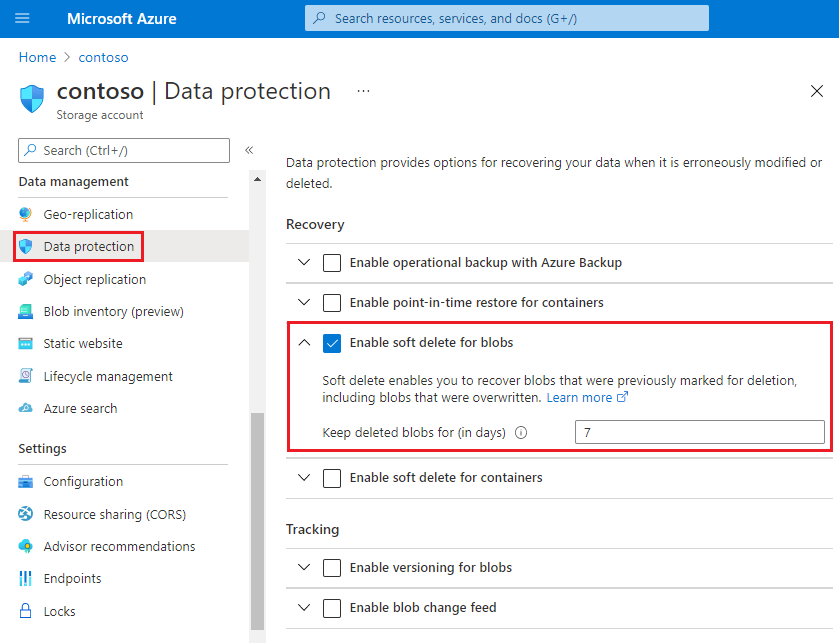
- Under Data management, select Data protection.
- In the Recovery section, select Turn on soft delete for blobs.
- Specify the retention period in days.
- Select Save.
Using Azure CLI
You can enable blob soft delete using the Azure CLI by updating the blob service properties. The following command enables soft delete and sets the retention period to seven days.
az storage account blob-service-properties update --account-name <storage-account> \
    --resource-group <resource-group> \
    --enable-delete-retention true \
    --delete-retention-days 7
To verify the setting, you can retrieve the current properties:
az storage account blob-service-properties show --account-name <storage-account> \
    --resource-group <resource-group>
Enable blob versioning
Blob versioning automatically maintains previous versions of a blob when it is modified. When versioning is enabled, every write operation creates a new version. You can restore an earlier version of a blob to recover your data if it is erroneously modified or overwritten.
Using the Azure portal
- Navigate to your storage account in the Azure portal.
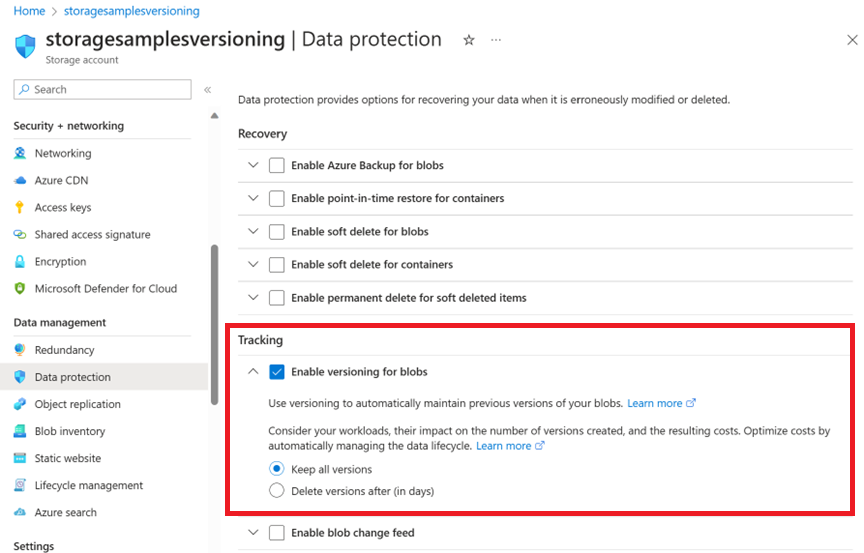
- Under Data management, select Data protection.
- In the Tracking section, select Enable versioning for blobs.
- Select Save.
Using Azure CLI
You can enable blob versioning using the Azure CLI. The following command enables versioning for the specified storage account.
az storage account blob-service-properties update \
    --resource-group <resource_group> \
    --account-name <storage-account> \
    --enable-versioning true
Verify the configuration
After enabling both features, you should verify that they are active. You can do this by checking the blob service properties in the Azure portal or via the CLI.
In the Azure portal, navigate to Data protection for your storage account. You should see that both Soft delete for blobs and Versioning for blobs are enabled. The retention period for soft delete should also be displayed.
Using the Azure CLI, you can verify the settings by running the az storage account blob-service-properties show command. The output should include deleteRetentionPolicy with enabled set to true and days set to your specified value, as well as isVersioningEnabled set to true.
Considerations
- Costs: Enabling soft delete and versioning does not incur additional charges for the features themselves. However, data in soft-deleted blobs and previous versions of blobs is billed at the same rate as active data until it is permanently deleted. Use lifecycle management policies to automatically delete old versions or soft-deleted blobs to control costs.
- Retention Period: Choose a retention period that balances your recovery needs with cost. A longer retention period increases storage costs but provides a longer window for recovery.
- Scope: These features are enabled at the storage account level. They apply to all blobs within the account. If you need different retention periods for different sets of blobs, consider using separate storage accounts.
By enabling blob soft delete and versioning, you add a critical layer of protection against accidental data loss. Regularly review your retention policies and verify the configuration to ensure your data remains safe.
References for Protect an application against accidental blob deletion: Enable soft delete for blobs, Enable and manage blob versioning, Data protection overview.