
Plan a Sentinel workspace before connecting data
The first Microsoft Sentinel connector is usually easier to configure than the workspace design is to change. Before sending logs anywhere, decide who should query them, where they can be stored and which team will operate the resulting detections.
Sentinel uses a Log Analytics workspace as its data foundation. Choosing that workspace therefore affects access, ingestion, retention and operational ownership. A workspace created for general infrastructure monitoring may be suitable, but its existence alone is not a reason to put security data there.
Microsoft’s workspace architecture decision tree starts with these constraints. Work through them before treating connector selection as the design exercise.
Separate the decisions that are easy to confuse
A subscription identifies an Azure management and billing boundary. A Microsoft Entra tenant establishes an identity boundary. A workspace determines where the collected data lives and how it is queried. These boundaries relate to one another, but they are not interchangeable.
An organisation can have several subscriptions in one tenant and still use a central security workspace. Conversely, a security team operating across tenants needs to account for the tenant-specific behaviour of its connectors. Microsoft’s guidance identifies tenant-bound data sources, including Microsoft 365 services, as a reason to plan separate workspaces.
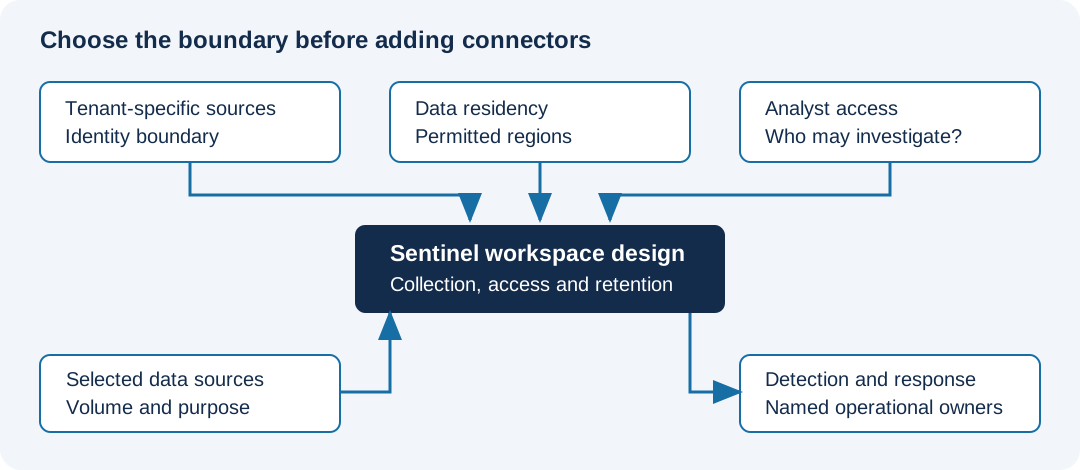
In this diagram, the decisions above the workspace constrain the design. Adding more connectors below it does not resolve a residency or access problem above it.
Write a small data-source inventory
For each proposed source, record the purpose of collecting it. “It has a connector” is not a sufficient purpose. Start with a detection or investigation question that needs that data.
| Question | What the answer changes |
|---|---|
| Which tenant owns the source? | Whether a native connector can use the intended workspace |
| Where may the data be stored? | Which workspace regions are acceptable |
| Who needs to investigate it? | Whether the proposed access model is appropriate |
| How much arrives each day? | Ingestion estimates and the need to control unnecessary volume |
| How long must it remain available? | Retention decisions and investigation expectations |
| Who maintains the connector and detections? | Operational responsibility after onboarding |
Treat estimated volume as an estimate. Firewall verbosity, server auditing and application activity can change it substantially. A short, representative pilot gives you a better basis for the next decision than multiplying a vendor example by the number of servers.
Keep the workspace count explainable
Start by looking for the smallest number of workspaces that satisfies the actual boundaries. More workspaces mean more places to manage analytics rules, automation and access. A separate workspace for every subscription may create work without providing a useful isolation benefit.
There are valid reasons to split. Different residency requirements, tenant-specific collection, security ownership or access restrictions can justify separate workspaces. Document the particular reason for each split so that the design remains understandable as subscriptions and teams change.
Be careful with the assumption that table-level permissions solve every analyst-access requirement. Microsoft’s architecture guidance explains that access to the Sentinel portal involves workspace-wide read permissions through its built-in roles. A person who should only query particular logs may need a different access route through Log Analytics. Establish whether that person needs the full Sentinel experience or only restricted query access before choosing the model.
Check operational logs and security logs together
Sometimes the operations team and the security team need the same source. Collecting it twice can create unnecessary cost, while combining unrelated data can expose information more broadly than intended.
Review overlap explicitly. Compare a shared workspace with separate workspaces using the expected ingestion, access requirements and available pricing terms. Microsoft’s decision tree includes cost illustrations, but those are examples rather than quotes for your environment. Keep your own assumptions alongside the design.
Region choice also needs more than a proximity rule. Confirm Sentinel availability in the proposed region, the data residency requirements and any relevant transfer costs. Do not assume that every region supporting Log Analytics already supports every Sentinel capability you need.
Prove the design with one useful detection
Choose a small set of sources for the pilot. Confirm that records arrive in the expected tables, that the authorised analysts can investigate them and that the retention settings match the plan. Then connect the data to a detection with an owner and a response procedure.
If the team can explain an alert, find the supporting records and act on it, the pilot is testing the whole operating model. Keep the workspace design record with that evidence before expanding collection.