
Cybersecurity starts with what your business needs to protect
Episode 1 of the series Cybersecurity in Practice
You have an application to run, people who need access to it, and information that should never end up in the wrong hands. Then someone asks whether the environment is secure. Where do you start?
Start by describing what needs to keep working, what information matters, and what would happen if either were compromised. That gives the security conversation a purpose. Choosing controls becomes easier when you can explain the problem each one is meant to address.
This series builds that reasoning from the ground up. We will work through identity, data, infrastructure, application design and security operations, using Microsoft guidance where it helps us make a decision. A new article will appear every Friday over the coming weeks. You can follow along with an application you support, even if you are still learning the security terminology.
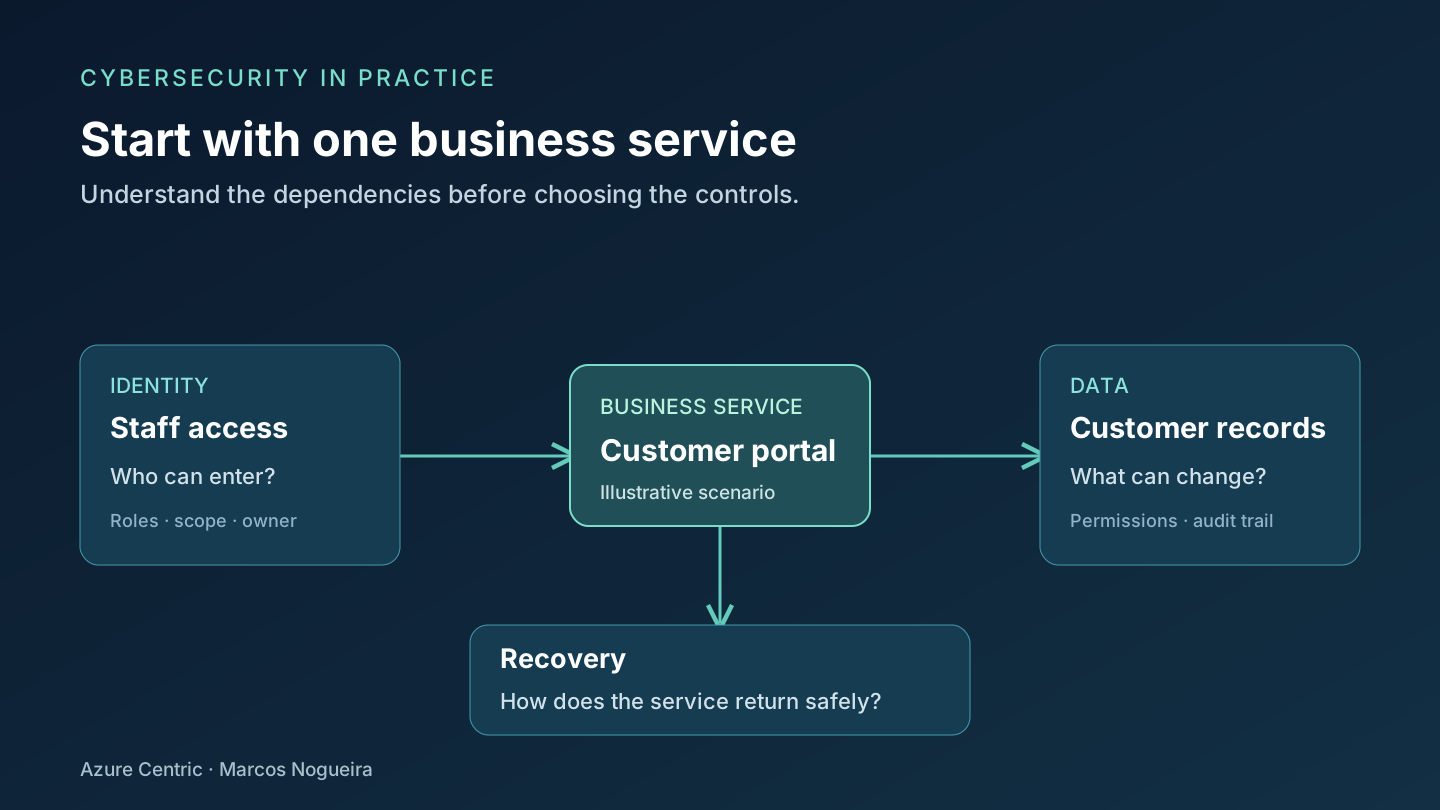
Start with a service you can describe
For this first article, consider a fictional customer portal. Customers submit requests, staff process them, and a small operations team maintains the application. The portal stores contact details and the history of each request. It also depends on an identity service, application hosting, storage and a recovery process.
There is already enough here for a useful security discussion. Someone could read records they should not see. Someone could alter a request or delete its history. The service could stop working when customers need it.
Those are different consequences. A backup may help recover deleted information, but it does not undo the disclosure of a customer’s details. A successful sign-in tells us something about identity; it does not establish that the user should see every record.
Microsoft’s Well-Architected security principles use confidentiality, integrity and availability as connected security concerns. In everyday terms: keep information within its intended audience, keep it trustworthy, and keep the service usable by the people who need it. We will examine that relationship more closely in the next article.
Give the risk a clear sentence
“We need better security” is difficult to turn into work. Try a sentence that names the service, the possible failure and its consequence instead.
For our fictional portal, that might be: An account with unnecessary access could expose customer requests from other teams. This is a proposed scenario to investigate, not evidence that a particular environment has the problem.
Now the next questions become more precise. Which accounts can read those requests? Who approved that scope? Can we see when access was used? Who can remove it if the account is compromised?
The table below is an illustrative starting point for that discussion. It is not an assessment result or a list of controls that every application must implement in exactly this way.
| Part of the portal | Question to investigate | Evidence to bring back |
|---|---|---|
| Staff access | Can each role access only the requests it needs? | Current role assignments and an agreed access model |
| Customer records | Can someone change a request without a trace? | An explanation of how changes are authorized and recorded |
| Recovery | Can the team restore a usable, trustworthy service? | A recovery procedure and the outcome of an authorized recovery exercise |
Notice that the evidence is something a person can examine. A green dashboard can be useful, but the conversation still needs to reach the application and the people responsible for it.
Use the Microsoft frameworks for different jobs
There are several ways into Microsoft’s security guidance. Knowing what each resource is for saves us from treating a reference diagram as a deployment checklist.
The Security Adoption Framework resources support an organization-wide security modernization effort. That is useful when the discussion includes strategy, responsibilities and the relationship between business priorities and technical work. For our portal, this is where we would connect the work to the wider security program rather than leave the application team to make every decision alone.
The Azure Well-Architected Framework looks at workload design through five pillars: reliability, security, cost optimization, operational excellence and performance efficiency. It helps frame a review of the portal itself. For example, a proposed security change needs an operational owner and a design the team can maintain.
The Microsoft Cybersecurity Reference Architectures, or MCRA, help explain how security capabilities fit together across an environment. Use them as a reference when you need to understand relationships or discuss a target architecture. They are not evidence that your environment already has those capabilities configured correctly.
These resources work at different levels. We will return to them as the series develops, with a specific question to answer each time.
The working phases I use
I organize this work into six practical phases drawn from my experience: Assess, Plan, Protect, Detect, Respond and Recover. Assess establishes what we have and where the concerns are; Plan turns those concerns into decisions with owners. The other phases cover putting safeguards in place, recognizing suspicious activity, dealing with incidents and restoring a trustworthy service.
These phases describe how I structure the work. They are not official Microsoft SAF phase names or a one-way sequence. Governance, accountability and learning run through all six, and detection and response readiness continue while we assess or improve protection. The NIST Cybersecurity Framework 2.0 provides a useful comparison: its functions are Govern, Identify, Protect, Detect, Respond and Recover, addressed concurrently. My Assess and Plan phases are a practical way to organize related work, rather than a one-to-one replacement for those functions.
Bring Zero Trust into the first decision
Microsoft describes three core Zero Trust principles: verify explicitly, use least-privilege access, and assume breach.
For our example, that gives us a practical line of questioning. How is a staff member’s access evaluated? Does their role need access to every team’s requests? If the account is taken over, what limits the damage and who investigates the activity?
We do not need to redesign the entire portal in this first discussion. We do need to stop assuming that access is appropriate simply because an account belongs to the organization. The useful outcome is a decision we can explain and check.
A suggested first working session
This is a planning exercise, not an official portal procedure. It does not require a new subscription, a paid security plan or changes to production.
- Choose one service. Write down what it does and who depends on it. Keep the first scope small enough that the people in the discussion understand it.
- Sketch its dependencies. Include people, identities, data, hosting and recovery. A simple diagram is enough; record anything you still need to confirm.
- Describe one possible failure. Use a sentence such as the unnecessary-access example above. Explain the consequence without inventing a probability or a financial figure.
- Assign the next investigation. Name the person who will check the current state, the evidence they will return and when the team will review it.
- Agree what happens after the check. If the concern is confirmed, who approves the change? If it is not confirmed, what evidence closes the question?
The first session should leave you with a clear next action. If nobody can say what will be checked or who owns it, reduce the scope and try again.
Before next Friday, complete that exercise for one service you know. In Episode 2, we will use confidentiality, integrity and availability to examine the same service from three different angles, and see why improving one area does not automatically solve the others.
Cheers,
Marcos Nogueira
Connect with me on LinkedIn