
Use DNS Private Resolver for hybrid name resolution
You need to resolve Azure private DNS zones from on-premises and on-premises domains from Azure. Azure DNS Private Resolver provides a managed path for this without requiring you to maintain custom DNS virtual machines.
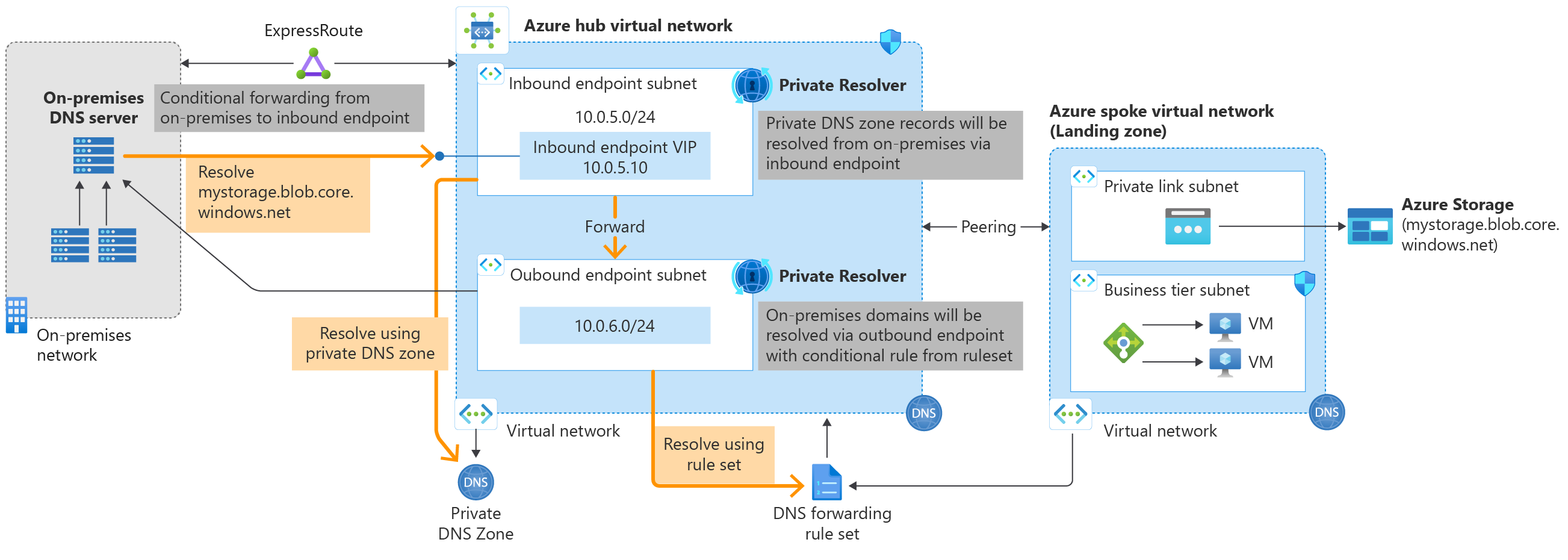
The service relies on two components: inbound endpoints that accept queries from outside Azure, and outbound endpoints that forward queries from Azure to external servers. These are connected by forwarding rulesets that determine where specific domain names should be sent.
Understand the resolution flow
When a client in an Azure virtual network issues a DNS query, the resolver follows a specific sequence. If the virtual network has custom DNS servers configured, the query is forwarded there first. If default Azure-provided DNS is used, the system checks for linked private DNS zones. If the query does not match a linked zone, it consults the virtual network links attached to DNS forwarding rulesets.
If a matching rule is found, the query is forwarded to the target IP address specified in that rule. If multiple rules match, the longest suffix is used. If no rule matches, Azure DNS resolves the query using public or private zone data as appropriate.
For hybrid scenarios, you must ensure that on-premises DNS servers can reach the Azure inbound endpoint, and that Azure outbound endpoints can reach your on-premises DNS servers. This requires a network connection such as ExpressRoute or a VPN gateway.
Plan your architecture
You can choose between a distributed or centralized approach. In a distributed architecture, you link forwarding rulesets to spoke virtual networks. This allows spokes to resolve specific zones via the hub resolver without changing their DNS client settings. In a centralized architecture, you configure the spoke virtual networks to use the hub’s inbound endpoint IP address as their custom DNS server. This forces all DNS traffic from the spoke to the hub.
A critical constraint in both models is the risk of DNS resolution loops. If you link a forwarding ruleset that contains a rule forwarding to the inbound endpoint to the same virtual network where that inbound endpoint is provisioned, queries may loop. Ensure that the hub virtual network is linked to the private zone but is not linked to a forwarding ruleset that forwards to its own inbound endpoint.
Prerequisites and restrictions
Before deploying, verify the following constraints:
- Virtual Network: The resolver must be in the same region as the virtual network it references. A single resolver can only reference one virtual network. Virtual networks with encryption enabled do not support the resolver.
- Subnets: You need dedicated subnets for inbound and outbound endpoints. These subnets must be delegated to
Microsoft.Network/dnsResolversand cannot host other services. The subnet size must be between /28 and /24. IPv6-enabled subnets are not supported. - Limits: A subscription can have up to 15 DNS private resolvers. Each resolver supports up to 5 inbound and 5 outbound endpoints. A forwarding ruleset can contain up to 1,000 rules.
- Connectivity: Azure ExpressRoute FastPath is not supported. Azure Lighthouse is not compatible with the resolver.
Configure the resolver
The following steps outline the configuration for a standard hybrid setup where Azure resolves on-premises domains and on-premises resolves Azure private zones.
- Create a Private DNS Zone: Create a zone such as
azure.contoso.comand link it to the virtual network where you will deploy the resolver. This allows Azure resources to resolve names within the zone using Azure-provided DNS. - Deploy the Resolver: Create an Azure DNS Private Resolver in the hub virtual network. Create an inbound endpoint in a dedicated subnet. Record its IP address (e.g.,
10.10.0.4). Create an outbound endpoint in a separate dedicated subnet. - Configure Forwarding Ruleset: Create a DNS forwarding ruleset in the same region. Link it to the hub virtual network. Add a rule for your on-premises domain (e.g.,
contoso.com) pointing to your on-premises DNS server IP address (e.g.,10.100.0.2). Ensure the rule is enabled. - Configure On-Premises DNS: On your on-premises DNS server, create a conditional forwarder for the Azure private zone (
azure.contoso.com). Set the forwarder IP address to the inbound endpoint IP (10.10.0.4). You can add a secondary IP for failover if required.
Verify the configuration
Test the resolution from both sides. From an Azure virtual machine in the hub network, query a name in the on-premises domain. The query path should go from the client to Azure DNS, then to the inbound endpoint, out through the outbound endpoint, and finally to the on-premises DNS server.
From an on-premises client, query a name in the Azure private zone. The query should go from the client to the on-premises DNS server, then to the conditional forwarder, into the Azure inbound endpoint, and finally resolve against the private zone records.
If queries fail, check the following:
- Ensure the subnets are correctly delegated and not shared with other services.
- Verify that network connectivity (ExpressRoute/VPN) allows traffic between the endpoint subnets and the on-premises DNS servers.
- Confirm that the forwarding ruleset is linked to the correct virtual network and that the rules are enabled.
- Check that the on-premises conditional forwarder points to the correct inbound endpoint IP.
This configuration provides a managed path for hybrid DNS resolution. You can extend it by linking additional virtual networks to the forwarding ruleset or by configuring failover endpoints as needed.
References for Use DNS Private Resolver for hybrid name resolution: Azure DNS Private Resolver Overview, Private resolver architecture, Resolve Azure and on-premises domains..