
Set RPO and RTO before selecting a recovery design
You cannot select a disaster recovery (DR) strategy until you have defined what the business can actually tolerate. The first technical decision is not which Azure service to use, but what the acceptable limits are for data loss and downtime. These limits are expressed as Recovery Point Objective (RPO) and Recovery Time Objective (RTO). Without these values, any DR design is a guess rather than an engineered solution.
Define the recovery objectives
A complete DR plan must specify critical business requirements for each process the application implements. These are not technical constraints imposed by Azure; they are business decisions that drive the technical architecture.
Recovery Point Objective (RPO) is the maximum duration of acceptable data loss. It is measured in units of time, not volume. For example, an RPO of “30 minutes” means the business can accept losing up to 30 minutes of data. It is about limiting and recovering from data loss, not data theft. If your RPO is zero, you cannot rely on periodic backups alone.
Recovery Time Objective (RTO) is the maximum duration of acceptable downtime. If your specification states that the acceptable downtime duration in a disaster is eight hours, then your RTO is eight hours. This dictates how quickly you must be able to fail over or restore services.
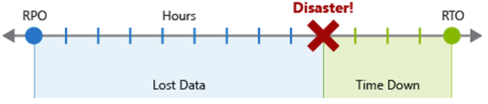
Each major process or workload should have separate RPO and RTO values. You determine these by examining disaster-scenario risks and potential recovery strategies. The process of specifying an RPO and RTO effectively creates DR requirements for your application based on your unique business concerns, such as costs, impact, and data loss tolerance.
Choose between backup and replication
Once you have your objectives, you can select the appropriate data recovery method. Azure offers two main methods for restoring data during a disaster: backups and replication. They serve different purposes and have different implications for your RPO and RTO.
Backup restores data to a specific point in time. By using backup, you can provide simple, secure, and cost-effective solutions to back up and recover your data to the Microsoft Azure cloud. Azure Backup is used to create long-lived, read-only data snapshots for use in recovery. Backups are generally cost-effective but introduce a time gap between the last backup and the disaster, which affects your RPO. Restoring from backup also takes time, which affects your RTO.
Data Replication creates real-time or near-real-time copies of live data in multiple data store replicas with minimal data loss in mind. The goal of replication is to keep replicas synchronized with as little latency as possible while maintaining application responsiveness. Most fully featured database systems and other data-storage products and services include some kind of replication as a tightly integrated feature. An example is geo-redundant storage (GRS). Replication typically offers a much lower RPO than backup, often approaching zero, but it is more complex and costly to maintain.
Different replication designs place different priorities on data consistency, performance, and cost:
- Active replication requires updates to take place on multiple replicas simultaneously, guaranteeing consistency at the cost of throughput.
- Passive replication does synchronization in the background, removing replication as a constraint on application performance, but increasing RPO.
- Active-active or multimaster replication enables using multiple replicas simultaneously, enabling load balancing at the cost of complicating data consistency.
- Active-passive replication reserves replicas for live use during failover only.
Design for disaster recovery
Disaster recovery is not an automatic feature. It must be designed, built, and tested. To support a solid DR strategy, you must build an application with DR in mind from the ground up. Azure offers services, features, and guidance to help you support DR when you create apps.
Disaster scenarios also commonly result in downtime, whether due to network connectivity problems, datacenter outages, damaged virtual machines (VM), or corrupted software deployments. In most cases, application recovery involves failover to a separate, working deployment. As a result, it may be necessary to recover processes in another Azure region in the event of a large-scale disaster. Additional considerations may include recovery locations, number of replicated environments, and how to maintain these environments.
Depending on your application design, you can use several different strategies and Azure features, such as Azure Site Recovery, to improve your application’s support for process recovery after a disaster. For some scenarios, you can use service-specific features to support fast recovery. For example, Azure SQL supports geo-replication for quickly restoring service in another region. Azure App Service has a Backup and Restore feature, and the documentation includes guidance for using Azure Traffic Manager to support routing traffic to a secondary region.
Verify your design against your objectives
The final step is to ensure your chosen design meets your defined RPO and RTO. This is not a one-time check but a continuous process. You must test your DR plan regularly to verify that you can actually meet your objectives under realistic conditions.
If your RPO is 30 minutes, does your replication strategy guarantee that data is copied within that window? If your RTO is four hours, can you fail over to your secondary region and restore service within that time? If the answer is no, you need to adjust your design or your objectives.
Start by documenting your RPO and RTO for each critical workload. Then, select the appropriate combination of backup and replication strategies. Finally, test your DR plan to verify that it meets your business requirements.
The next step is to review the disaster recovery guidance by service for the specific Azure services you are using. This will help you understand the specific DR features available for each service and how to configure them to meet your RPO and RTO.
References for Set RPO and RTO before selecting a recovery design: Disaster recovery overview for Microsoft Azure products and services.