
Separate backup, high availability and disaster recovery
Two running copies of an application do not necessarily give you a way to recover yesterday’s data. A successful backup does not necessarily give you a working application within an hour. Backup, high availability and disaster recovery contribute to resilience, but each needs a clear job.
A useful design starts with the failures the workload must handle. Include the application, its data and the people who will carry out recovery. A service can report healthy while the business process that depends on it remains unavailable.
Give each mechanism a purpose
| Mechanism | Main question | What still needs attention |
|---|---|---|
| High availability | Can the service continue through the failures it was designed to tolerate? | Shared dependencies, capacity, health checks and application behaviour |
| Backup and restore | Can we recover an acceptable earlier state? | Recovery-point consistency, retention, access protection and restore time |
| Disaster recovery | Can we restore an acceptable business service after a major disruption? | Data, compute, connectivity, identity, configuration, people and verification |
The boundaries overlap. A backup can be the data-recovery method in a DR plan. Replication can support both availability and recovery. The important distinction is what the complete design achieves, rather than which product name appears on the architecture slide.
Agree the recovery objectives first
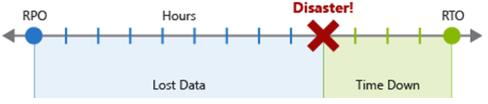
The recovery point objective, or RPO, is the maximum acceptable period of data loss. The recovery time objective, or RTO, is the maximum acceptable period of downtime. Microsoft’s disaster recovery overview defines both as business requirements for the workload.
For an illustrative internal application, stakeholders might accept losing up to 30 minutes of changes and restoring the service within four hours. Those values are requirements for this example, not measured recovery results or a recommendation for every application.
Agree what “service restored” means. Starting a VM is a different milestone from users signing in, reading consistent data and completing a transaction. The RTO check should use the business milestone that was agreed.
Also define how you will establish the recovered data point. A backup job’s successful status is useful evidence, but the recovery point must be suitable for the application. For a multi-component workload, independently recoverable copies can still represent inconsistent points in its business process.
High availability needs a working path around failure
Availability features reduce the impact of failures within the scope of the design. Multiple application instances, appropriate health checks and resilient data services can help a workload continue when an instance or a fault domain fails.
Azure availability zones provide physically separate locations within a region. You still need to choose supported services and configure the application accordingly. Placing one VM in one zone does not create a second application instance. Nor does a zone-resilient data service remove a single point of failure in the application’s connectivity.
Microsoft’s availability-zone guidance distinguishes zonal resources from zone-redundant services. Check the behaviour of the resources you actually deploy.
Avoid defining HA purely by geography. A workload may use more than one region as part of its availability design. Conversely, a deployment in two regions can remain unavailable if both depend on the same broken configuration or identity path.
Backups need recoverable, protected history
Replication aims to maintain copies of live data. It can also carry an unwanted change into those copies. A backup gives you a recovery point to restore, subject to the protection mechanism, its retention and its consistency.
Azure Backup provides recovery-point management for supported workloads. Select the appropriate protection method rather than assuming that one VM backup covers every connected database, file share and external service.
Backups also need protection from the incident they are meant to help you recover from. Review administrative access, deletion protection, retention and the supported security controls. A backup is not automatically immune to malicious deletion or ransomware simply because it exists.
Run a restore into an isolated environment. Check the data, required keys and application configuration, and confirm that the restored copy can support the intended process. A green job history does not replace that exercise.
Disaster recovery connects the pieces
A DR plan describes how to recover from disruption beyond the availability design’s tolerance. That can include a regional outage, a damaging deployment or another incident with a sufficiently large impact. It is not limited to natural disasters.
The recovery strategy might use backups and rebuilt infrastructure, a prepared standby environment, or service-specific replication and failover. A continuously running duplicate is one possible design, not a universal prerequisite.
Choose a strategy which can meet the objectives, then list its dependencies. Include deployment artefacts, network routes, name resolution, certificates, identities, secrets and access to the recovery data. Decide who declares recovery, who authorises potentially lossy failover, and who confirms that users can resume work.
For replicated systems, consider what happens if recent writes are missing. For restored systems, include the time to obtain capacity, rebuild components and validate them. Both approaches need a plan for returning to normal operation and handling changes made while running in recovery mode.
Exercise three different failures
Use a controlled environment and a written success criterion for each exercise.
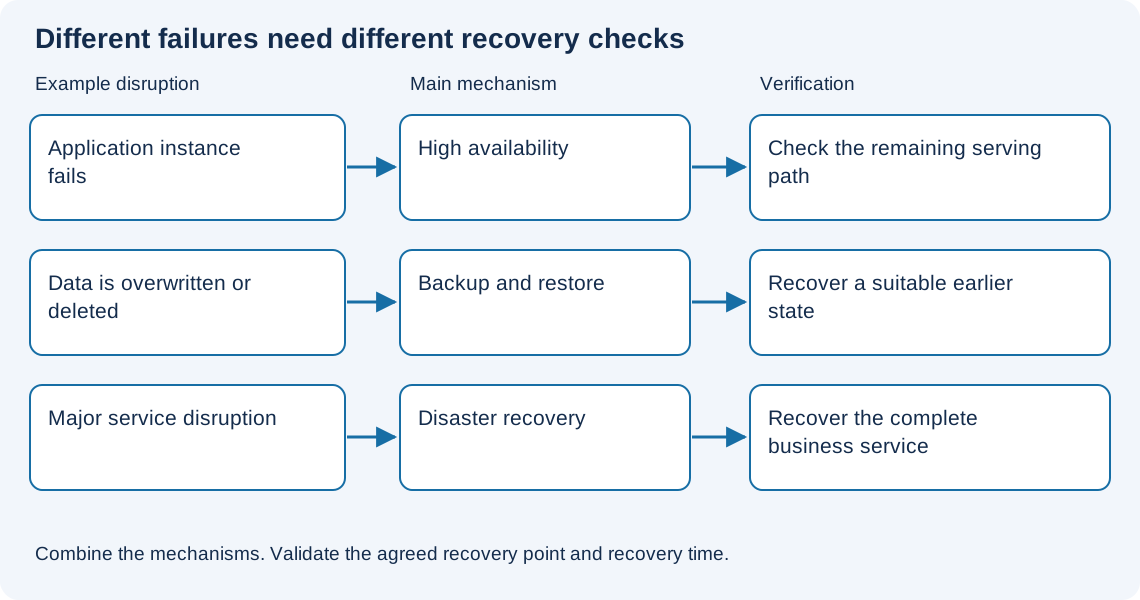
- Lose an application instance. Check whether the remaining path can serve requests and whether health checks remove the failed instance as intended.
- Make an unwanted data change. Restore a suitable earlier recovery point and verify the affected business data.
- Make the normal service path unavailable. Follow the recovery runbook, including dependencies and user access, and measure the complete recovery.
Record the observed data-loss window, elapsed time and any manual intervention. Compare those observations with the agreed RPO and RTO. If the result falls short, change the design or renegotiate the objective before describing the workload as ready.