
PowerShell 7.7 GA: validate the job before upgrading the host
An automation upgrade is ready when the job still produces the result its consumers expect, under the identity and execution environment that will run it. Starting a new shell successfully answers only the first question.
Microsoft announced PowerShell 7.7 general availability on 10 November. The release uses .NET 11 and is a Standard Term Support (STS) release. It brings command improvements, security hardening and changes that can alter existing scripts. The proposed approach is to pilot the jobs whose outputs, error handling or deployment packaging depend on those changes before updating a shared automation host.
Review the script contracts first
The announcement changes the default output of New-Guid from version 4 UUIDs to time-sortable version 7 UUIDs. The textual shape remains familiar, so checking that an identifier merely looks like a GUID will miss the semantic change. Review validators, storage consumers and assumptions about how identifiers are generated. Microsoft identifies [guid]::NewGuid() as the route for version 4 GUIDs; neither version should be treated as a substitute for a purpose-designed secret generator.
Formatting and error handling also deserve attention. Format-Table, Format-List and Format-Custom reject null or empty values for -Property. The release changes null-or-empty argument validation to throw System.ArgumentException. A wrapper that catches a specific previous exception type may therefore need attention even when its successful path still works.
Explicit false values on affected switches are now respected, including operator switches on Where-Object. Exercise both true and false inputs in wrappers that pass switches through to other commands. A test containing only the common successful case will not establish that the filtering logic remains correct.
For CSV-producing jobs, review the now-invalid combination of Export-Csv -Append and -NoHeader, and the deprecation warning for -NoTypeInformation. Check the resulting file and the process that reads it, including whether warnings are treated as a failed job. These are documented release changes, not failures observed in a customer environment.
Keep the security controls in the pilot
The release also changes behaviours around constrained language, remoting, help extraction and JSON schema references. For example, Test-Json requires an explicit -FetchExternalReference opt-in to resolve external schema references. Establish whether a validation job depends on those references and review their locations and trust before enabling that behaviour.
Microsoft’s language-mode guidance explains the relationship between Constrained Language Mode and application control. A manually restricted session is not evidence that a production application-control boundary has been reproduced. Test with the intended policies and identity; do not weaken them simply to make the pilot pass.
New conveniences can wait until that baseline is understood. New-TemporaryDirectory reduces the work needed to create a uniquely named temporary directory, while Join-Path -Extension adds another way to build paths. A job adopting a new command also acquires a minimum runtime requirement. Keep its deployment and compatibility expectations explicit.
Choose the package and lifecycle deliberately
The 7.7.0 release assets are available, but documentation is still catching up. At review time, the What’s New page still described a preview and the support lifecycle page still listed 7.7 as preview without its final support dates. The GA announcement establishes the release status; those stale labels should not be used to invent an STS end date or a final module-version inventory.
Windows packaging needs particular care. The current installation guidance states that 7.7.0 has no MSI package, and the release assets include MSIX and ZIP packages. That is a 7.7 packaging change, not a claim that MSI packages disappeared from every PowerShell 7 release. Check the chosen method’s limitations against unattended jobs, remoting and the host operating system before replacing an existing deployment procedure.
PowerShell uses the MIT licence. The practical budget is the engineering time and infrastructure needed for validation; paid support and any Azure resources used by a pilot are separate considerations. This article recommends no billable deployment and makes no promise of a performance improvement or lower operating cost.
Make the rollout evidence repeatable
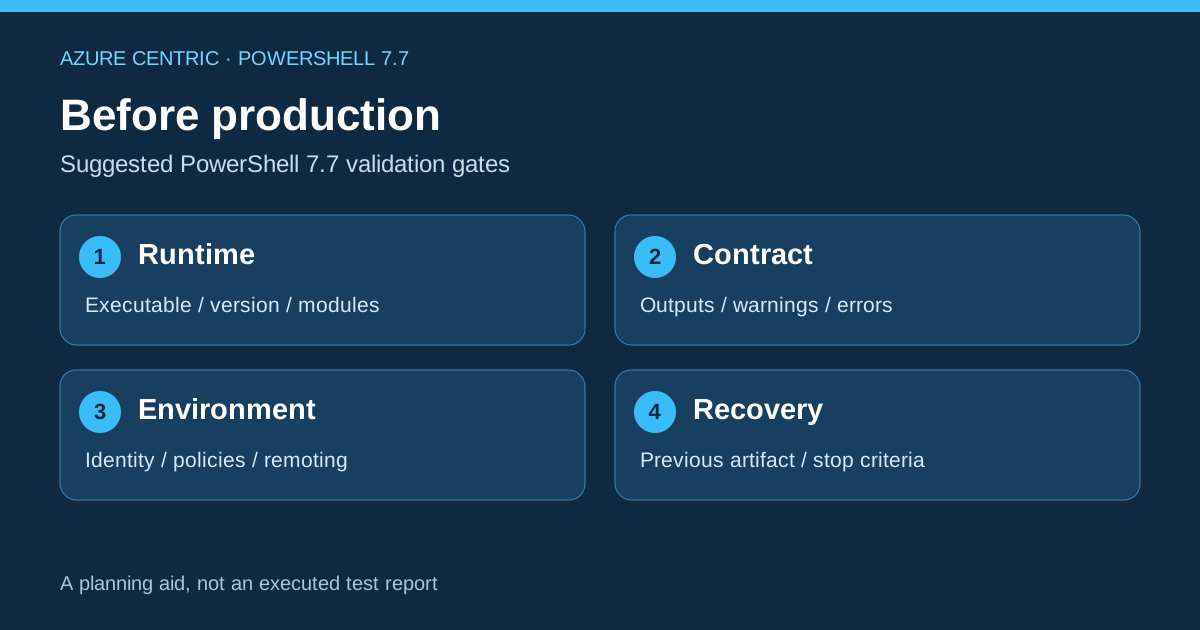
For a hypothetical scheduled job that exports an inventory file, compare the existing runtime with 7.7 using representative inputs. Retain the output, warnings, exit behaviour and the reader’s result. Include an empty input and an invalid input, then run under the intended service identity and policies.
| Gate | Evidence to keep |
|---|---|
| Runtime | Exact executable, version, architecture, modules and installation method. |
| Contract | Expected output and error behaviour, including GUID, filter and CSV assumptions. |
| Environment | Relevant identity, permissions, language mode, remoting and external dependencies. |
| Recovery | Previous deployment artifact, restore procedure and criteria for stopping rollout. |
This is a suggested validation plan, not an executed PowerShell 7.7 test report. Pin the candidate runtime in the pilot, confirm the package and support information for your platform, and expand deployment only after the job’s owner can explain the evidence. The release offers useful improvements; adoption should leave the automation’s behaviour and recovery route understandable.
Marcos Nogueira
LinkedIn