
Plan regional recovery without overlooking identity and DNS
When a region goes down, the first thing you notice is not the missing virtual machines, but the broken login pages and the DNS records that still point to the primary site. Disaster recovery is not an automatic feature of Azure; it is a design choice that requires you to account for data, traffic routing, and identity. If you focus only on replicating compute, you will likely fail your Recovery Time Objective (RTO) because users cannot authenticate or resolve your domain name.
The starting point is to define what “recovery” actually means for your specific workload. You need to establish a Recovery Point Objective (RPO) and a Recovery Time Objective (RTO). RPO is the maximum acceptable data loss, measured in time, such as “30 minutes of data.” RTO is the maximum acceptable downtime, defined by your business requirements, for example, “eight hours.” These metrics dictate your strategy. A low RPO demands active or near-active replication, while a high RPO might allow for backups. A low RTO requires hot or warm standbys; a high RTO permits cold standbys that must be started from scratch.
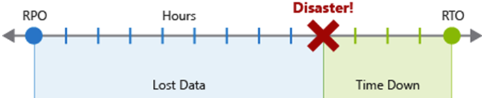
Once you have these targets, you must design the failover mechanism. Failover involves redirecting traffic from unhealthy instances to healthy ones. In a multi-region setup, this usually means switching from a primary region to a secondary region. The critical component here is DNS. Azure DNS provides a reliable mechanism for this switch, but it requires careful configuration. The DNS server itself is outside the failover zone, so it remains available even if your application region is down. However, the speed of the switch depends on the Time-To-Live (TTL) value of your DNS records. If your TTL is set to one hour, clients may continue to hit the failed primary for up to an hour, regardless of how fast you promote your secondary site. To meet a tight RTO, you should set the TTL to a low value, such as 300 seconds or 5 minutes, ensuring resolvers refresh their cache quickly.
Consider a concrete example: you are running an application with a primary site at prod.contoso.com and a disaster recovery site at dr.contoso.com. You have a public record www.contoso.com that points to the production site. During normal operations, www.contoso.com is a CNAME record pointing to prod.contoso.com. Both records have a TTL of 300 seconds. If a disaster occurs, you update the www.contoso.com record to point to dr.contoso.com. Within five minutes, most clients will resolve the new IP address. You can perform this update manually via the Azure portal or automate it using Azure CLI. The following command illustrates the CLI approach for updating the CNAME record:
az network dns record-set cname set-record \
  --resource-group <resource-group> \
  --zone-name contoso.com \
  --record-set-name www \
  --cname dr.contoso.com
This code is an illustrative example of the command structure; it has not been tested in this environment. You must replace the resource group name and zone details with your actual configuration. While the Azure CLI works for manual intervention, production automation typically uses Azure Functions or Logic Apps triggered by health checks, as suggested by the source’s mention of ‘Azure functions or within a third-party monitoring application’ Reliability in Azure DNS.
However, DNS and data replication are only half the battle. Identity is often the hidden bottleneck in disaster recovery. Microsoft Entra ID is a global service, so authentication itself does not fail when a region goes down. The bottleneck usually lies in your application logic or regional data dependencies. For example, if your application caches tokens or relies on regional endpoints for user profile data, you must ensure the secondary region can still access that data. If you are using Azure AD Domain Services or other regional identity components, you must check the specific service’s DR capabilities in the service reliability guide Failover and failback. A common mistake is to assume that enabling a secondary region automatically provides identity continuity. It does not. You must explicitly configure identity failover or ensure your identity provider is region-agnostic.
Another critical consideration is the scope of your failover. Failover can happen at different levels: a database replica, an availability zone, or an entire region. Microsoft handles failover for zone-redundant services automatically. For example, if you use a zone-redundant SQL Database, Microsoft promotes a passive replica if a zone fails. You do not need to manage this. However, for region-level failover, you are responsible. You must configure Azure Site Recovery to replicate virtual machines and disks to the secondary region, or use service-specific replication features like geo-redundant storage for data. Azure Site Recovery can perform the failover for you, but you must test it regularly. A plan that has never been tested is not a plan; it is a hope.
When you fail back to the primary region, the process can be more complex than the initial failover. Data synchronization issues may arise if the primary site continued to accept writes during the outage, even if those writes were rejected by the application layer. You must ensure data consistency before redirecting traffic back. This might involve manual intervention to resolve conflicts or resetting the database to a known good state. Additionally, if you attempted remediation on the primary site before the failover, it might be in an unknown state. You may need to redeploy the primary instance to ensure it is clean before failing back. This adds to the downtime during the failback process, so plan for it in your RTO calculations.
Finally, remember that availability zones do not automatically guarantee application availability, and a region pair does not automatically replicate all application data. Asynchronous cross-region replication does not establish an RPO of zero. You must distinguish between internal availability objectives and contractual SLAs. Your DR plan should include specific steps for identity verification, DNS updates, and data consistency checks. Test these steps regularly. When the next disaster strikes, you will not have time to figure out why your login page is broken. You need a plan that accounts for every dependency, from the DNS record to the identity provider.
To verify your plan, run a tabletop exercise that includes the identity team and the network team. Ask them to walk through the failover process, including the DNS update and the identity validation. If they cannot do it within your RTO, adjust your design. This is the only way to ensure that your recovery plan works when it matters.
References for Plan regional recovery without overlooking identity and DNS: Disaster recovery overview for Microsoft Azure products and services, Failover and failback, Reliability in Azure DNS.