
Map an Azure workload across its failure domains
You are designing a workload that must survive a datacentre failure, but you are unsure whether your resources are actually protected or just placed in the same physical building. The first step is not to deploy, but to map your architecture against the two distinct ways Azure handles availability zones: zonal and zone-redundant.
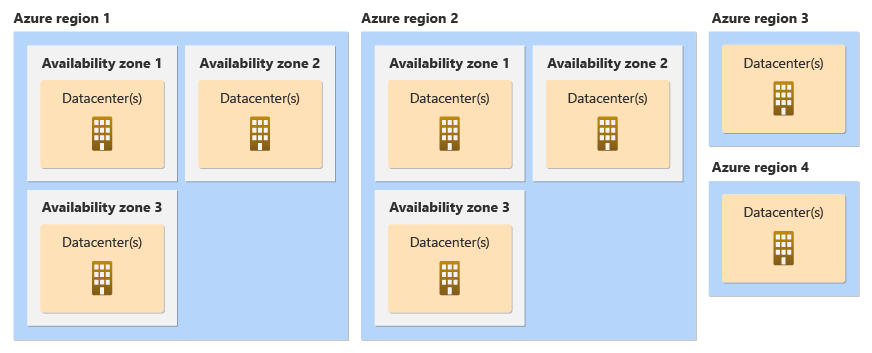
Azure availability zones are physically separate datacentres within a region, connected by a high-performance network with round-trip latency of less than 2ms What are Azure availability zones?. They have independent power, cooling, and networking infrastructure What are Azure availability zones?. However, simply selecting a region that supports zones does not guarantee your workload is distributed across them. You must explicitly configure your resources to use either zonal or zone-redundant deployment models, or they may remain vulnerable to a single-zone outage.
Distinguish zonal from zone-redundant services
The core of your mapping exercise is understanding which architectural pattern fits each component of your stack. Azure services support one or both of these approaches What are Azure availability zones?.
Zone-redundant services are spread across multiple availability zones by Microsoft. Data replication and request distribution are managed by the platform. If one zone fails, Microsoft handles the failover automatically. Platform as a Service (PaaS) services typically support this model. For example, Azure SQL Database and App Service support zone-redundant configurations Azure availability zone migration baseline. Note that for some PaaS services, zone redundancy is the default for supported tiers, though specific legacy or low-tier configurations might require explicit enablement. Always verify the exact tier requirements in the Availability zone service and regional support documentation.
Zonal resources are pinned to a specific availability zone. You are responsible for deploying instances across multiple zones, managing data replication between them, and distributing traffic. Infrastructure as a Service (IaaS) services, such as Virtual Machines, typically follow this model. You can use Virtual Machine Scale Sets (VMSS) Flex to explicitly place VMs in specific zones, which is a recommended approach for spreading VMs across multiple availability zones Azure availability zone migration baseline. VMSS Flex distributes instances across available zones by default unless a specific zone is targeted. In this case, you must implement your own load balancing and replication strategies to ensure high availability What are Azure availability zones?.
A common mistake is assuming that deploying resources in a zone-enabled region automatically provides zone resilience. If you do not select a zone configuration for a resource, it will not be zone resilient and can go down during a zonal outage Azure availability zone migration baseline.
Map your workload components
To map your workload, list every component and determine its zone support status. Use the Availability zone service and regional support documentation to verify which services and SKUs are available in your target region Azure availability zone migration baseline.
Consider a typical three-tier web application:
- Frontend (Web App or VMSS): If using Azure App Service, check if the plan supports zone redundancy. If using VMSS Flex, you can rely on default distribution across zones or explicitly target specific zones if latency sensitivity requires it. Use a Zone-Redundant Standard Load Balancer to distribute traffic across them Azure availability zone migration baseline.
- Backend (APIs/Compute): If stateless, zone-redundant deployment is often sufficient. If stateful or latency-sensitive, you might need zonal deployment with co-located components Azure availability zone migration baseline.
- Database (SQL/MySQL): Verify if the service offers zone-redundant replication. For Azure SQL, this is often a configuration option during deployment Azure availability zone migration baseline.
For latency-sensitive components, such as high-frequency trading or gaming simulations, you might need to co-locate resources in the same zone to minimize network hops, then replicate those resources across other zones Azure availability zone migration baseline. This requires a more complex architecture where some services are zonal and others are zone-redundant Azure availability zone migration baseline.
Verify physical zone mapping
There is a subtle but critical detail: physical zones are mapped to logical zones (1, 2, 3) differently for each subscription. Subscription A might map Physical Zone X to Logical Zone 1, while Subscription B maps the same Physical Zone X to Logical Zone 3 What are Azure availability zones?. Azure subscriptions are automatically assigned a physical-to-logical zone mapping at creation. This mapping may differ between subscriptions and is not user-configurable What are Azure availability zones?.
If your application has strict co-location requirements or if you are migrating from a non-zone region, you need to know which physical datacentre corresponds to the logical zone you are targeting. You can retrieve this mapping using the Azure Resource Manager API What are Azure availability zones?.
Here is an illustrative example using Azure CLI to list the location details, including the zone mapping:
az rest --method get --uri '/subscriptions/{subscriptionId}/locations?api-version=2022-12-01' --query 'value'This command returns details for each region, including the availability zone mapping. Use this to confirm that your logical zone selections align with your physical infrastructure expectations, especially if you are dealing with strategic services that may not be available in all physical zones Azure availability zone migration baseline.
Decide on your resilience strategy
Your mapping should lead to a clear decision on how to handle failures:
- Single-Region Zone Redundancy: Suitable for most workloads where data residency is a constraint. Configure zone-redundant services where possible. For zonal services, deploy across multiple zones and use load balancing Azure availability zone migration baseline.
- Multi-Region: Required if you need protection against regional failures or if your region lacks zone support. Use regional pairs for this, as they are geographically separated to protect against regional disasters Azure availability zone migration baseline.
- Hybrid: A combination of zonal, zone-redundant, and global services may be necessary to meet specific business and technical requirements Azure availability zone migration baseline.
Before finalising your design, check SKU availability in the specific zones of your target region. Some services or SKUs may only be available in certain zones Azure availability zone migration baseline. If your required SKU is not available in a zone, you may need to choose a different region or adjust your architecture.
Finally, remember that availability zones do not automatically guarantee application availability. Your application code must be designed to handle distributed models and potential network partitions Azure availability zone migration baseline.
To verify your mapping, review the inventory of your resources in the Azure portal. Confirm that zone-redundant resources show zone redundancy status, and zonal resources are explicitly assigned to different zones. If you are using VMSS Flex, check the instance distribution across zones. This verification ensures that your workload is truly distributed across failure domains, rather than just residing in a zone-enabled region.