
Choose availability zones without assuming application resilience
Placing resources in different availability zones does not automatically make an application resilient. It provides a physical separation of infrastructure, but the application must be designed to handle the failure of one of those zones. The first thing to check is whether your workload relies on zonal or zone-redundant configuration, as the responsibilities for replication and failover differ significantly between the two.
Zonal versus zone-redundant configurations
Azure offers two primary ways to use availability zones within a region. Understanding the distinction is critical before deploying any workload.
Zonal resources are pinned to a specific availability zone. You are responsible for managing data replication and distributing requests across zones. If an outage occurs in a single availability zone, you must handle the failover to another zone. This approach is often chosen for latency-sensitive components that require physical proximity, such as high-frequency trading or certain gaming simulations, where round-trip latency must remain under 2ms.
Zone-redundant resources are spread across multiple availability zones automatically. Microsoft manages the spreading of requests and the replication of data. If one zone experiences an outage, Microsoft manages the failover automatically. Platform as a Service (PaaS) services typically support zone-redundant deployments, while Infrastructure as a Service (IaaS) services often support zonal deployments. However, you should always check specific service documentation, as exceptions exist and service-specific support varies.
A common mistake is to assume that deploying two virtual machines in different zones provides high availability. While this configuration is required to achieve the highest possible SLA connectivity percentage, it does not guarantee application resilience if the application code is not designed to handle the loss of one of those instances.
Assessing application readiness
Before migrating to availability zones, you need to assess your application’s readiness. The migration baseline outlines three key considerations.
Latency requirements
If your application includes components that are sensitive to latency, a zonal deployment might be necessary. Azure availability zones within the same region are connected by a high-performance network with less than 2ms round-trip latency. However, this low latency comes with the trade-off that you must manage replication and failover yourself.
For most workloads where low latency is not a strict requirement, a zone-redundant deployment is recommended. This approach provides higher uptime SLAs and protection against zonal outages without requiring you to manage the distribution of requests.
Distributed model readiness
If your application follows a distributed microservices model, you need to consider the impact of ongoing data exchange between microservices across zones. This continual data exchange through APIs can affect performance. To improve performance and maintain a reliable architecture, you might choose a zonal deployment for latency-sensitive resources.
In a zonal deployment, you must:
- Identify latency-sensitive resources or services in your architecture.
- Confirm that these resources support zonal deployment.
- Co-locate the latency-sensitive resources in the same zone.
- Replicate these zonal services across multiple availability zones to ensure zone resiliency.
- Load balance between the multiple zonal deployments using standard or global load balancers.
If the Azure service supports availability zones, using zone-redundancy by spreading nodes across zones is generally recommended for higher uptime.
Business continuity and data residency
For business continuity and disaster recovery within the same Azure region, zone-redundancy is highly recommended, especially if there is no regional pair. This approach is also applicable to industries with strict data residency and governance requirements within the same region.
If you require multi-region disaster recovery, or if your Azure region does not support availability zones, you should use regional pairs. Regional pairs are geographically separated to provide blast radius protection from regional-level failures, such as natural disasters. The exact distance varies by region, but the isolation is designed to ensure that a single regional event does not affect both locations.
Physical and logical zone mapping
It is important to note that physical zones are mapped to logical zones in your Azure subscription. This mapping is assigned at the time the subscription is created and can differ between subscriptions. For example, physical zone X might be mapped to logical zone 1 in one subscription, but to logical zone 3 in another.
To understand the mapping between logical and physical zones for your subscription, you can use the Azure Resource Manager API. This information is particularly important for critical application components that require co-location with strategic services that may not be available in all physical zones.
az rest --method get --uri '/subscriptions/{subscriptionId}/locations?api-version=2022-12-01' --query 'value'This command retrieves the location information, including the logical zone mapping, for your subscription.
Verification and next steps
To verify your application’s resilience, you should test your applications for availability and resiliency. This includes simulating zone outages and observing how your application handles the failure of one of the zones.
For specialized workloads such as SAP, Azure Virtual Desktop, Azure Kubernetes Service, and Oracle, there are specific landing zone architecture guidance and best practices. You should refer to these resources to ensure your deployment aligns with the recommended configurations.
The diagram below illustrates the physical separation of availability zones within an Azure region, highlighting the independent power, cooling, and networking infrastructure that supports resilience.
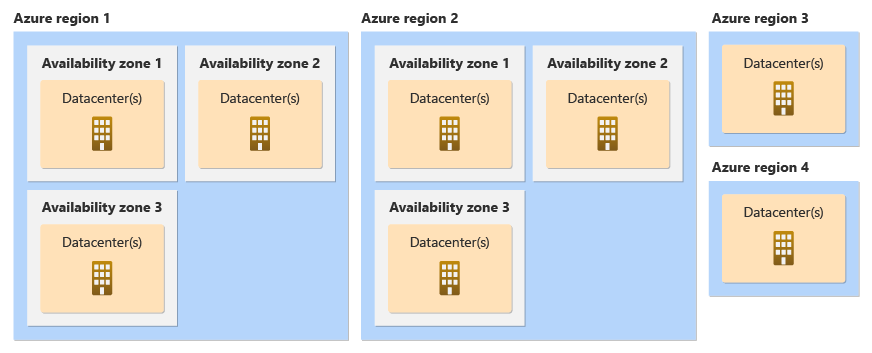
By carefully assessing your application’s latency requirements, distributed model readiness, and business continuity needs, you can choose the appropriate availability zone configuration. Remember that infrastructure placement is only one part of the equation; your application code must also be designed to handle failures gracefully.
References for Choose availability zones without assuming application resilience: Azure availability zone migration baseline, What are Azure availability zones?.