
Understand the trade-offs of Azure Spot Virtual Machines
Este artigo ainda não foi traduzido — está a ver a versão em inglês.
You are looking at a cheaper price for virtual machines, but you need to understand what you are buying. Azure Spot Virtual Machines let you use unused Azure capacity at a significant discount, but that capacity can be reclaimed by Azure at any time. This is not a bug; it is the fundamental trade-off. You get a lower price in exchange for accepting that your workload might be interrupted. If your application cannot handle sudden shutdowns, Spot is not the right choice. If it can, you can save a considerable amount on compute costs.
Understanding the eviction reality
The core constraint of Spot VMs is that they have no Service Level Agreement (SLA) for availability. Azure can evict them when it needs the capacity back for pay-as-you-go workloads or when the current Spot price exceeds the maximum price you have set. When eviction happens, you get a 30-second notice. This is delivered via Azure Scheduled Events, which you can configure your application to listen for, allowing it to gracefully shut down or save state before the VM is terminated.
You have two choices for what happens when that eviction notice arrives:
- Deallocate (Default): The VM is stopped and moved to a stopped-deallocated state. You can try to redeploy it later, but there is no guarantee that capacity will be available. Crucially, these deallocated VMs still count against your subscription quota and you continue to be charged for the underlying disks.
- Delete: The VM and its underlying disks are deleted immediately. You stop paying for storage, but you also lose the state entirely. This is suitable for stateless workloads where you can simply restart from scratch.
This distinction is vital for cost management. If you choose Deallocate and do not have capacity available to restart, you are paying for storage without getting compute. If your workload is truly stateless and can be rebuilt, Delete is often the cleaner option to avoid lingering costs.
Managing price and capacity constraints
Spot pricing is variable, based on region and SKU. You can set a maximum price you are willing to pay, in US dollars, using up to five decimal places. For example, 0.98765 sets a max price of $0.98765 per hour. If the current Spot price rises above this threshold, your VM will be evicted.
There is a special value for the maximum price: -1. If you set the max price to -1, the VM will not be evicted for pricing reasons. Instead, the price will be the current Spot price or the standard pay-as-you-go price, whichever is less. This effectively caps your cost at the standard rate while still allowing you to benefit from lower Spot prices when available. This is often a sensible default for workloads that are sensitive to price spikes but can tolerate occasional interruptions.
However, price is only one side of the equation. Capacity is the other. Even if your max price is set to -1, you might still face eviction if Azure needs the capacity for other workloads. Conversely, you might fail to deploy a VM initially if there is no capacity available in that region and size. The error code SkuNotAvailable indicates this specific constraint. You cannot force capacity; you can only request it.
Choosing the right VM size and scope
Not all VM sizes are available for Spot. The B-series and promotional versions of sizes (such as Dv2, NV, NC, H promo sizes) are excluded. You must choose from the supported general-purpose or compute-optimized sizes that are currently available in your target region.
When deploying, remember that Spot VMs cannot be placed in Availability Sets. This is a hard limitation. If you need high availability, you must use standard VMs. For Spot, you are accepting a single point of failure at the infrastructure level. If you are using Virtual Machine Scale Sets, you can use either Flexible or Uniform orchestration modes. This is confirmed by the documentation stating Spot applies to both Flexible scale sets and Uniform scale sets.
To find the best balance of price and stability, you can use the Spot VM size recommendation tool in the Azure portal when creating a Scale Set. This tool filters available sizes by region, price, and historical eviction rates. An eviction rate of 10% per hour means there is a 10% chance of eviction within the next hour, based on the last seven days of data. You can use this data to select a size that offers a lower risk of interruption, even if it means a slightly higher base price.
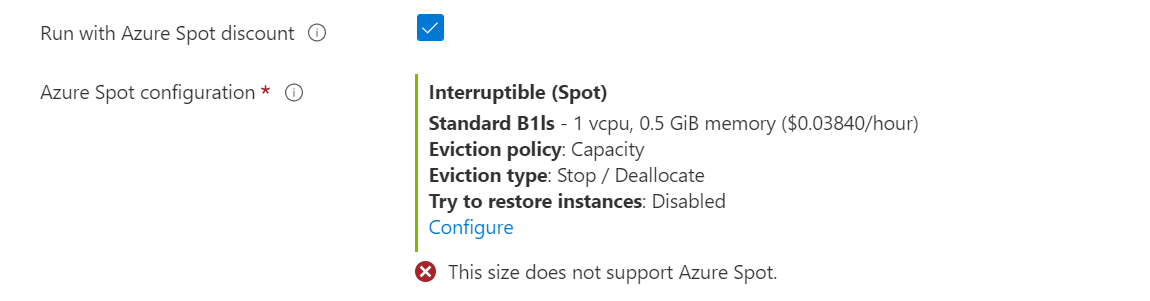
Practical deployment considerations
When you deploy a Spot VM, you are making a conscious decision to prioritise cost over reliability. Here is how you can structure that decision:
- Workload Type: Only use Spot for stateless, fault-tolerant workloads. Batch processing, dev/test environments, and large compute jobs are ideal. Production databases or stateful applications are not.
- Eviction Handling: Implement logic to handle the 30-second eviction notice. Use Azure Scheduled Events to trigger graceful shutdowns or save checkpoints. If you do not handle this, your application will simply vanish, potentially causing data corruption or inconsistent states.
- Quota Management: Spot VMs have a separate quota pool from standard VMs. Ensure you have sufficient Spot quota in your subscription. You can request additional quota through the standard Azure support process if needed.
- Pricing Monitoring: You can query Spot pricing history and eviction rates programmatically using Azure Resource Graph. This allows you to build custom dashboards to monitor the cost-effectiveness of your Spot instances over time. The
SpotResourcestable in Resource Graph provides this data.
If you encounter an error like SpotPriceGreaterThanProvidedMaxPrice, it means the current Spot price has exceeded your set limit. You will need to either increase your max price or deallocate the VM and update the price setting. Note that you cannot change the max price while the VM is allocated; you must deallocate it first.
Ultimately, the decision to use Spot VMs comes down to your application’s ability to absorb interruptions. If you can design your workload to be resilient to sudden loss of compute, Spot offers a significant cost advantage. If you cannot, the savings are not worth the risk of instability. Start with a small, non-critical workload to test the eviction behaviour and refine your handling logic before scaling up.
For detailed error codes and troubleshooting steps, refer to the Error codes for Azure Spot Virtual Machines and scale sets instances documentation.
tags: [azure-spot-vms, virtual-machines, cost-optimization, cloud-architecture, azure-scale-sets] diagram: {title: