Separate an infrastructure move from application modernisation
Este artigo ainda não foi traduzido — está a ver a versão em inglês.
You are planning a move to Azure, but your application team wants to refactor the code while your infrastructure team wants to lift and shift the servers. These two objectives often collide because they require different timelines, different risk profiles, and different validation criteria. Treating them as a single monolithic project usually delays the infrastructure move or forces premature, risky code changes.
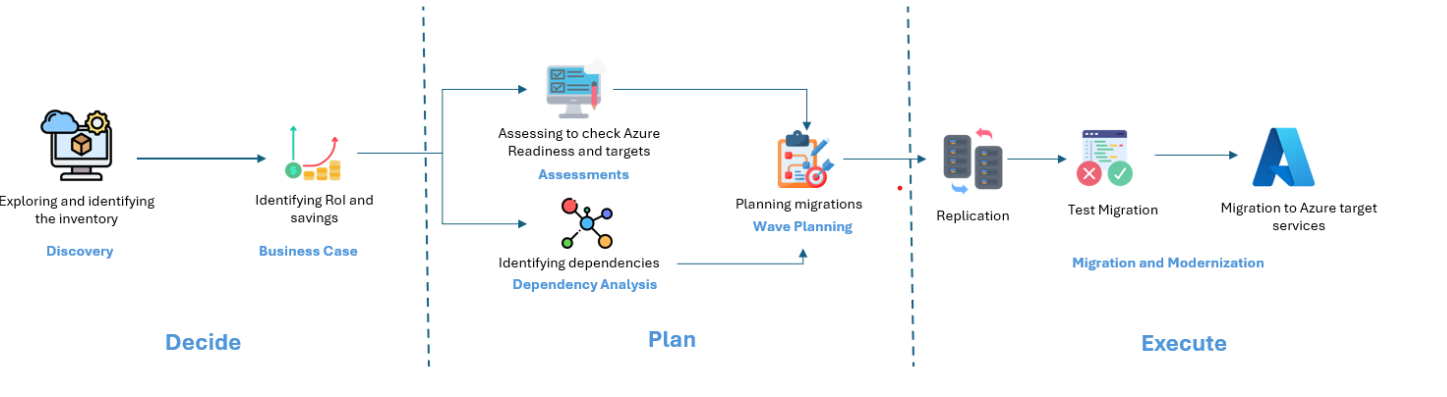
The practical solution is to separate the infrastructure migration from the application modernisation. Azure Migrate supports this decoupling by providing distinct tools for assessment, planning, and execution. You can use the service to move the underlying compute and storage to Azure first, ensuring the environment is stable and costed, and then apply application-specific modernisation patterns on top of that new foundation.
Assess infrastructure readiness separately from application compatibility
The first step is to understand what you are moving. Azure Migrate provides assessment capabilities for servers, databases, and web applications, but these assessments serve specific, distinct purposes. The Server Assessment evaluates readiness for Azure Virtual Machines, rightsizing, and cost estimation Overview Assessment. The Database Assessment evaluates readiness for Azure SQL Database, Azure SQL Managed Instance, or SQL Server on Azure VM Build a migration plan with Azure Migrate.
Start by discovering your on-premises estate. Azure Migrate uses a lightweight appliance to collect configuration and performance data from VMware, Hyper-V, and physical servers. This data is essential for determining Azure readiness. The assessment process evaluates three key attributes in sequence: Azure readiness, rightsized targets, and monthly costs. A workload only proceeds to sizing if it passes the readiness check. If a server is marked as “Not ready for Azure,” it requires remediation before it can be migrated as-is. This might involve upgrading an end-of-support operating system or fixing compatibility issues.
For application modernisation, the readiness criteria are different. You need to identify which parts of the application can be decoupled or refactored. For example, a web app might be assessed for migration to Azure App Service, while its underlying database is assessed for Azure SQL Database. The assessment report for databases shows migration readiness status, potential blockers, and compatibility levels. These blockers are often code-level issues, such as the use of unsupported SQL Server features. Addressing these blockers is part of the modernisation effort, not the infrastructure migration.
Azure Migrate can assist with some infrastructure fixes, such as upgrading Windows Server OS during migration using a specific feature. This feature uses an Azure VM Custom Script Extension to perform an in-place upgrade while keeping settings, server roles, and data intact Build a migration plan with Azure Migrate. However, this is a specific capability for Windows Server, not a general remediation tool for all “Not ready” states or non-Windows operating systems.
Plan the migration path with distinct goals
Once you have the assessment data, you can build a migration plan. The plan should clearly distinguish between the infrastructure move and the application modernisation. For infrastructure, the goal is to get the workloads running in Azure with minimal downtime and optimized costs. For application modernisation, the goal is to improve agility, scalability, or maintainability.
Azure Migrate helps you prioritize workloads based on strategic factors. You might prioritize “quick wins” for infrastructure migration, such as servers that are fully ready for Azure and have low complexity. These can be lifted and shifted using the Azure Migrate and Modernize tool. For application modernisation, you might prioritize workloads that have clear benefits from PaaS offerings, such as web apps that can benefit from the managed nature of Azure App Service.
The planning phase also involves sizing and cost estimation. Azure Migrate provides sizing recommendations based on performance history, which helps you right-size Azure VMs. For application modernisation, you need to estimate the cost of the target PaaS services. The assessment report for databases, for example, provides recommendations for database SKU, pricing tier, and compute level. These estimates are crucial for building a business case and justifying the modernisation effort.
Dependency analysis is another critical part of planning. Azure Migrate can visualize dependencies between servers, which helps you understand the impact of moving one workload on another. This is particularly important for application modernisation, where you might need to refactor the application architecture to support a distributed model. Understanding these dependencies ensures that you do not break the application when you move the infrastructure.
Execute infrastructure migration first
With the plan in place, you can start the execution phase. The recommended approach is to migrate the infrastructure first. This allows you to establish the Azure environment, validate the network connectivity, and ensure that the workloads are running correctly in the cloud. You can use the Azure Migrate and Modernize tool to migrate on-premises VMs to Azure. This tool supports agentless and agent-based migration for VMware and Hyper-V VMs, as well as migration of physical servers About Azure Migrate.
For databases, you can use the Azure Database Migration Service (DMS) to migrate on-premises databases to Azure SQL Database, Azure SQL Managed Instance, or SQL Server on Azure VM. DMS is a fully managed service designed for these specific Azure SQL targets Build a migration plan with Azure Migrate. This allows you to move the data layer to the cloud while the application layer is still on-premises, or you can move both simultaneously.
For web applications, the integrated Azure Migrate and Modernize tool focuses on server migration. Web app migration typically uses the standalone Azure App Service Migration Assistant, which assesses on-premises websites for migration to Azure App Service About Azure Migrate. Do not conflate the integrated server migration tool with the standalone web app migration tool.
Once the infrastructure is in Azure, you can focus on the application modernisation. This might involve refactoring the code to use PaaS services, containerizing the application, or implementing microservices. The infrastructure migration provides a stable foundation for these changes. You can test the modernised application in Azure before committing to the full migration, reducing the risk of failure.
Verify and iterate
After the infrastructure migration, you should conduct post-migration testing. This includes functional, integration, security, and performance testing to ensure that the migrated apps work as expected. For application modernisation, you should also test the new architecture to ensure that it meets the desired outcomes, such as improved scalability or reduced operational overhead.
Azure Migrate provides tools to help you monitor the migration process and track the progress of your workloads. You can use the assessment reports to compare the before-and-after state of your workloads, ensuring that the migration was successful. You can also use the business case insights to evaluate the cost savings and operational benefits of the migration.
The key to success is to keep the infrastructure migration and application modernisation separate but connected. The infrastructure migration provides the platform, and the application modernisation provides the value. By separating these efforts, you can manage the risks, optimize the costs, and achieve your business goals more effectively.
Start by assessing your workloads with Azure Migrate. Identify the infrastructure components that are ready for migration and the application components that need modernisation. Build a plan that reflects these distinctions, and execute the infrastructure migration first. Once the foundation is in place, you can confidently modernise your applications in Azure.