
Deploy an App Service application with a staging slot
Este artigo ainda não foi traduzido — está a ver a versão em inglês.
A staging slot lets us deploy and inspect an application before directing production traffic to it. The useful boundary is the candidate version and its configuration. The slot does not automatically provide an independent database or make every release reversible.
This walkthrough assumes an existing App Service web app and a release package or pipeline already used by the team. Microsoft’s staging environment guidance documents deployment slots for the Standard, Premium and Isolated App Service plan tiers. Confirm the tier and available slot capacity before starting.
Add the slot and inspect what was copied
Open the web app in the Azure portal. Select Deployment slots, then Add Slot. Give the slot a name such as staging and choose whether to clone configuration from an existing slot.
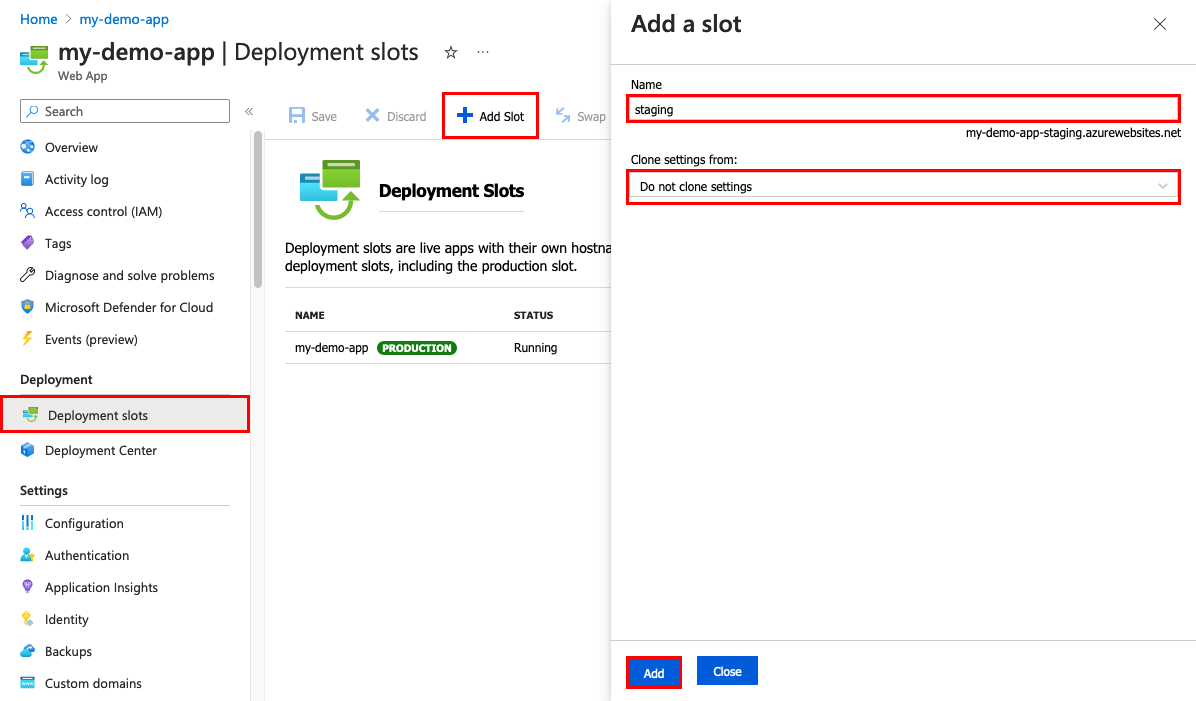
Cloning configuration is not cloning the deployed application. The new slot has no application content until a release is deployed to it. Microsoft also notes that a private endpoint is not cloned across slots, so verify the candidate’s connectivity separately.
The slot has its own hostname. By default, its production traffic allocation is zero, but that does not make it a private test environment. Review its access controls and authentication before exposing a candidate that should be restricted to the release team.
Decide which settings belong to the slot
Before deploying, inspect app settings and connection strings in the slot’s Configuration page. Mark a setting as a deployment slot setting when it should remain associated with that slot rather than swap with the application.
Use a small configuration review rather than assuming every setting should behave the same way:
| Setting or dependency | Question to resolve |
|---|---|
| Database connection | Which database may the candidate read or modify during testing? |
| External service credentials | Are the permissions appropriate for this environment? |
| Scheduled or background work | Could the candidate process production work before the swap? |
| Release identifier | How will the team verify which build is serving a request? |
| Network dependencies | Can the slot reach the services required for startup and normal operation? |
Do not rely on a slot hostname to isolate downstream effects. A staging instance using production credentials can still change production data.
Also understand the swap sequence. App Service applies relevant target configuration to the source instances during preparation. Startup and background code must tolerate that phase without performing unintended work. A successful staging test with test dependencies is only one part of the release assessment.
Deploy the candidate to staging
Use the established deployment mechanism, explicitly targeting the staging slot. For a pipeline, review the application and slot inputs before running it. For slot-specific publishing credentials or a publish profile, protect them as deployment secrets.
Confirm the deployed build through the staging hostname. Exercise the application paths that matter, including authentication and downstream service access. A landing page returning HTTP 200 does not establish that a user can complete the business operation.
Record the results and any outstanding issue before starting the swap. Keep the production release identifier available so the post-swap check can distinguish the old and new versions.
Review the swap source and target
In Deployment slots, select Swap. Use staging as the source and production as the target. Review the source and target configuration changes shown by the portal before confirming.
The following Azure CLI command illustrates the same direction for example resource names:
az webapp deployment slot swap --resource-group rg-azc-web-lab --name azc-slot-lab --slot staging --target-slot productionThis command has not been executed for this article. Replace the example names with the intended resources and confirm the selected subscription before using it.
App Service prepares and warms the source instances before changing routing. That platform behaviour does not establish that the application is healthy, that its database migration is compatible or that long-running work survives instance recycling.
Where suitable, swap with preview pauses after the preparation phase for further validation. The documented limitation is that it cannot be used when one of the slots has site authentication enabled. Check the app’s configuration before choosing that release path.
Verify production and keep recovery realistic
After the swap, confirm the release identifier through the production hostname and repeat the critical client operation. Check application errors and dependencies, not only the swap operation’s status.
The former production application is now in the other slot, which can support a swap back if required. Keep that version intact while assessing the release.
A reverse swap exchanges the application and applicable configuration. It does not reverse database writes, schema changes or external actions already performed by the new version. Plan those compatibility and recovery decisions before promotion.
Retain the deployment, configuration review and client-check results together. The slot is useful when it creates a repeatable release decision with evidence, rather than a second endpoint that nobody has checked.