
Choose an App Service plan around the workload
Este artigo ainda não foi traduzido — está a ver a versão em inglês.
Two web applications can have different names, different deployment pipelines and different owners, while still competing for the same compute. In Azure App Service, the boundary to look at is the App Service plan.
A plan defines the operating system, region, worker size, instance count and pricing tier used to host your applications. Choosing the plan therefore involves more than finding an affordable SKU. It determines which applications share capacity and which capabilities are available to them. Microsoft’s App Service plan overview describes that relationship.
Treat the plan as a capacity decision
In the dedicated compute tiers, the applications in one plan share its worker instances. An additional application does not receive a separate allocation of CPU and memory simply because it has its own entry in the portal.
Deployment slots also use the plan’s resources. A staging slot running a busy test workload can therefore affect capacity available to the production application. Logs, backups and WebJobs can add work on the same instances too.
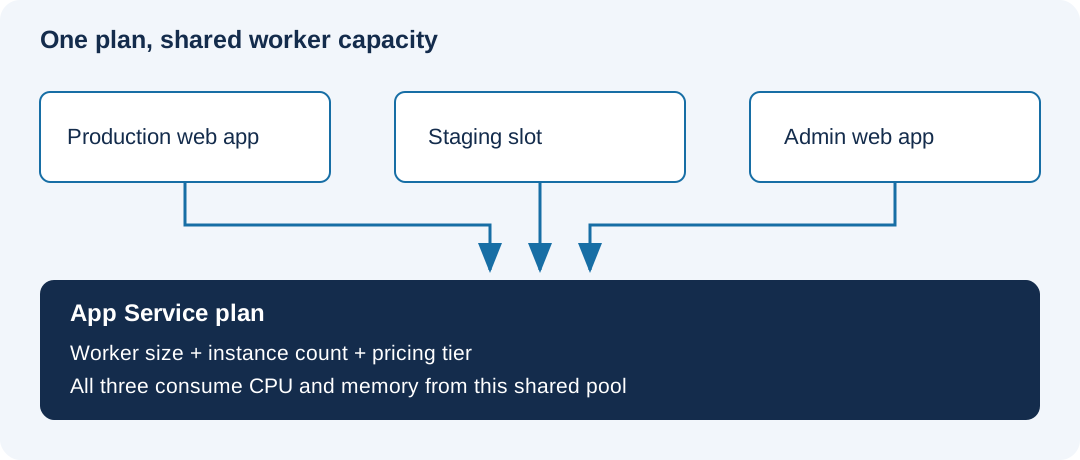
For an illustrative example, consider a customer-facing application and a small administrative portal. Sharing a plan may be reasonable if there is sufficient capacity and their operational requirements fit together. If the administrative portal runs a large report at the same time as the public application reaches its peak, that shared boundary becomes relevant very quickly.
Do not decide from the application count alone. Look at the resource demand, the timing of that demand and what should happen when one application is under pressure.
Separate worker size, instance count and features
These are related choices, but they answer different questions:
| Choice | What you are deciding |
|---|---|
| Worker size | How much CPU and memory each instance provides |
| Instance count | How many workers host the applications in the plan |
| Pricing tier | Which features and scale limits are available |
| Separate plan | Whether the application needs its own compute and scaling boundary |
Scaling up changes the tier or worker size. Scaling out adds instances within the supported limits. For the normal plan-wide scaling configuration, the applications share that expanded pool of workers. If two services need independent scaling policies, a separate plan is a straightforward boundary to evaluate.
Check feature support explicitly. Dedicated compute does not mean that every tier offers the same autoscaling or deployment-slot capabilities. Standard introduces capabilities such as deployment slots that are unavailable in lower tiers; Premium provides further capacity and feature options. Match each requirement to the tier rather than relying on the word “production”.
Use the compute categories for the right question
Free and Shared tiers use shared compute with CPU quotas and no scale-out. They are intended for development and testing. That describes resource allocation; it does not mean that Azure provides no application or tenant isolation.
Basic, Standard and the Premium tiers use dedicated compute for the plan. Other customers’ applications do not share those dedicated workers, while your own applications within the plan do share them.
Isolated tiers use App Service Environment for a different hosting and network-isolation model. Evaluate that model when the workload requires it. A need for one particular networking feature is a reason to check its supported configurations, rather than automatically choosing the most isolated tier.
The operating system and region also constrain the choice. Confirm runtime support and regional tier availability before putting a particular SKU into a design document. A Windows application and a Linux application cannot simply share one plan because their traffic patterns are similar.
Compare the whole hosting arrangement
Putting another application into a paid dedicated plan can make good use of capacity you already fund. Creating an additional plan introduces its own compute charge. Separating the applications may improve operational control, but it does not automatically reduce the bill.
Compare the two arrangements using the capacity each requires, its instance count and the hours it runs. Include the effect of staging slots and the resources needed during deployments. Then consider whether a capacity problem or maintenance activity in one application should affect the other.
Before accepting the plan, record four things: the required features, the expected shared load, the scaling approach and the reason for sharing or separating the applications. Those details give the next administrator a useful explanation of the design when a new application arrives or the workload grows.