
Choose a hub-and-spoke topology for a small Azure estate
Este artigo ainda não foi traduzido — está a ver a versão em inglês.
A hub-and-spoke design is useful when several workloads need a shared network service, such as a VPN gateway or a firewall. The hub gives that service a home, and the spokes give the workloads their own virtual networks. Before creating either, write down which connections you intend to allow.
For a small estate, that first decision matters more than the shape of the diagram. Two applications with the same ownership and connectivity requirements may fit comfortably into separate subnets in one virtual network. Separate spokes become more useful when you have a reason to manage their address spaces, connectivity or ownership independently. Microsoft’s virtual network guidance also recommends avoiding unnecessary numbers of small virtual networks.
Start with a traffic matrix
Consider an illustrative estate with one production application and a separate test environment. Both need a common route to shared services. Production and test should only communicate where a specific requirement has been approved.
| Network | Example address space | Purpose |
|---|---|---|
| Hub | 10.10.0.0/16 | Shared connectivity and a firewall |
| Production spoke | 10.20.0.0/16 | Production application subnets |
| Test spoke | 10.30.0.0/16 | Test application subnets |
These ranges are examples. Check them against existing Azure networks, on-premises networks and planned connections before allocating them. Non-overlapping address space is a prerequisite for this peering design.
For each required flow, record the source, destination, protocol and port. Also record whether it needs firewall inspection. “Allow the production application to reach one test API on TCP 443” is a decision you can implement and check. “Connect the spokes” leaves too much unanswered.
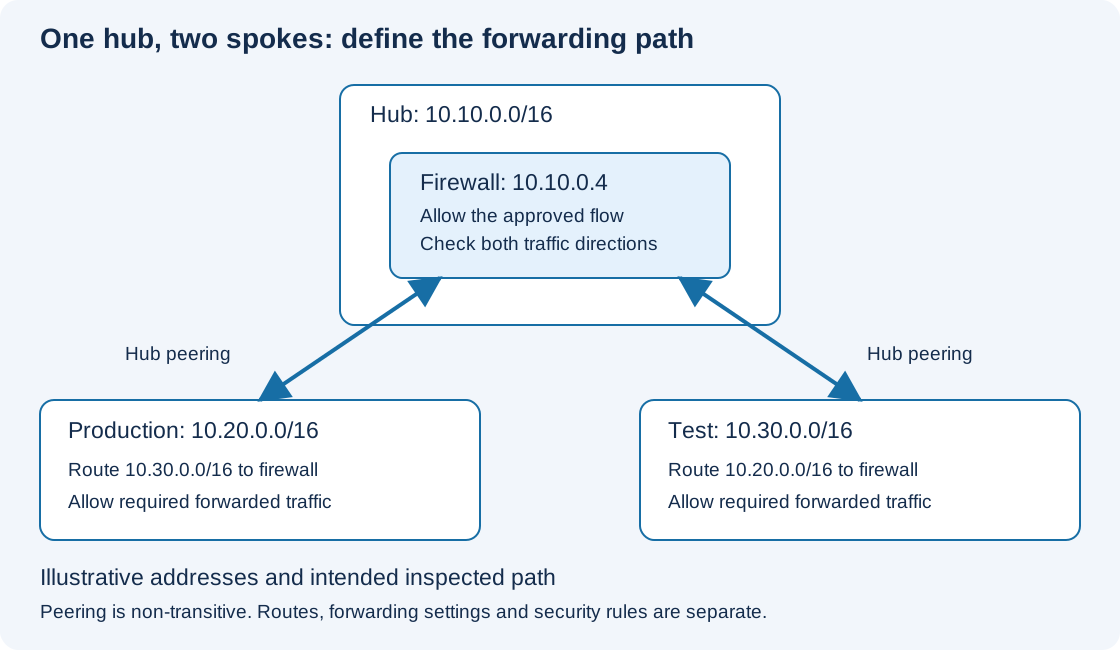
The diagram shows an intended inspected path. The peering links provide connectivity between each spoke and the hub; the routes and firewall rules make the illustrated path work.
A peering is not a transit router
Peering production with the hub and test with the hub does not, by itself, connect production to test. Azure virtual network peerings are non-transitive. Microsoft’s peering configuration reference makes this constraint explicit.
For an inspected spoke-to-spoke path, the source subnet needs a route towards the appliance in the hub. The appliance must permit the connection and be able to forward it to the destination. The return traffic needs a compatible path as well.
Check the peering settings for receiving forwarded traffic from the hub. That option permits the relevant forwarding behaviour across the peering; it does not create a route, install an appliance or replace the security rules. If the hub contains a VM-based network virtual appliance, its network interface and guest operating system also need the appropriate forwarding configuration. Azure Firewall is a managed service, so do not copy guest operating system instructions onto it.
Microsoft describes this use of an appliance in a peered network as service chaining.
Make the route choice visible
Suppose the example firewall’s private IP address is 10.10.0.4. An explicit route design for approved production-to-test traffic could include:
| Applied to | Destination prefix | Next hop type | Next hop address |
|---|---|---|---|
| Production workload subnet route table | 10.30.0.0/16 | Virtual appliance | 10.10.0.4 |
| Test workload subnet route table | 10.20.0.0/16 | Virtual appliance | 10.10.0.4 |
Use the firewall’s actual deployed private IP address. Associate each route table with the intended workload subnet. The firewall also needs the rules that allow the chosen application flow; a route does not grant permission.
A default route, 0.0.0.0/0, can be part of an outbound design, but it is not proof that every packet will reach the firewall. Azure normally selects the matching route with the longest prefix. A more-specific peering route or a route learned from a gateway can therefore take precedence over that default. For matching prefixes, route-source precedence also matters. Check the route-selection rules against the effective routes on the actual interface.
This matters when someone later adds a direct peering or connects an on-premises network. A topology can still look like a hub and spokes while a new route changes the traffic path.
Keep shared gateways and DNS deliberate
If the spokes need on-premises connectivity through a gateway in the hub, configure gateway transit as a separate part of the design. A spoke using a remote gateway cannot also have its own gateway. Do not assume that enabling gateway transit sends every connection through the firewall.
Name resolution needs its own plan too. Record how each workload will resolve the names it uses, and test that separately from IP connectivity. A successful connection to an IP address does not prove that the application’s normal connection string will work.
There is also an operating cost to this choice. Peering data transfer is charged, and shared firewall or gateway services add their own costs. Estimate the expected traffic paths and service costs before deciding that centralisation is worthwhile for a small deployment.
Check one complete connection
Start with a permitted application flow and verify it in both directions. Check the source interface’s effective route for the actual destination IP, the firewall decision and logs, the destination’s security rules, and the return route. Use Network Watcher to investigate connectivity, then confirm the application request itself.
Follow that with a connection which should be denied. A successful request establishes that something is reachable; an expected denial helps establish that the boundary is working. Keep the traffic matrix with the network configuration so that the next peering or route change has a clear set of checks.